Adding an Avatar to an Existing Voice Agent: Five Tests for a Useful Pilot
Evaluate an avatar with your existing voice agent using five practical browser tests: one audio path, interruption, secure startup, device recovery and accountable runtime costs.
A practical browser acceptance plan for teams evaluating Kasamila with their own voice stack.
Your voice agent is halfway through explaining a product setting when the user says, “Actually, I’m on mobile.” The next few seconds reveal a lot: does the old answer stop, does the new answer fit the question, and does the avatar follow the voice the user actually hears?
That is a useful moment to include in an avatar pilot. A prepared greeting can show the visual style. A working conversation lets your team evaluate the complete experience.
This guide proposes a small browser pilot for an existing voice agent. It is an implementation plan, not a report of a customer deployment or measured performance.
Choose one useful task
Start with a narrow workflow, such as helping a software user find the setting for inviting a teammate. Use a test workspace, approved help content and read-only answers. Keep account changes in the product’s existing controls.
Prepare a short set of questions: a normal request, an ambiguous request, a correction halfway through an answer, an unsupported feature and a request that needs human help. Decide what a successful answer and next step look like before testing.
Keep the voice provider, answer logic and knowledge sources consistent. Kasamila supplies browser-side audio-driven avatar inference and rendering; your application remains responsible for the conversation, its data and any actions. Speech recognition, language-model and text-to-speech services are separate parts of that design. The Runtime integration guide explains the API and browser SDK responsibilities.
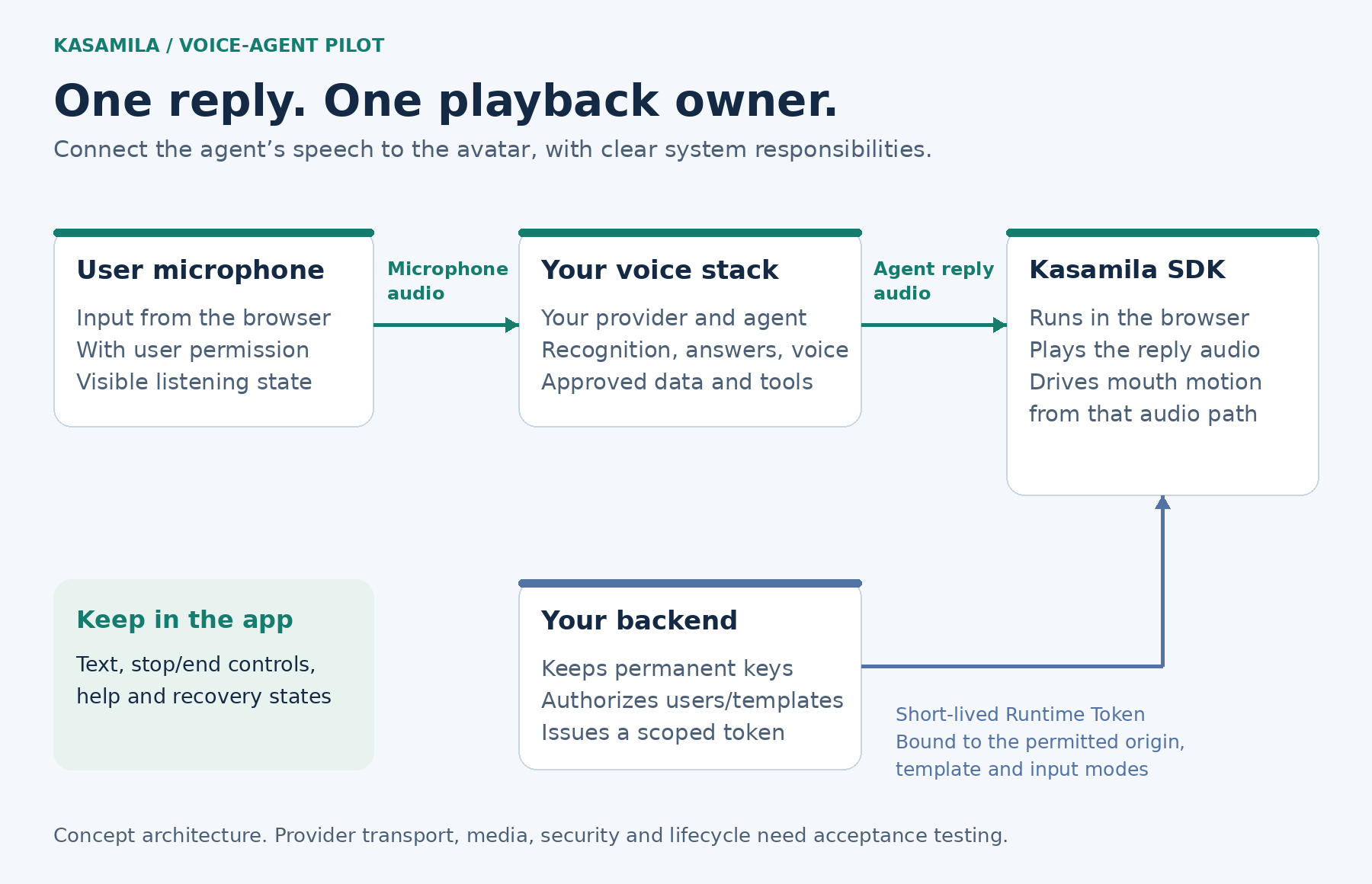
Figure 1: Proposed integration responsibilities. Concept architecture, not a product screenshot or a deployed customer system. Provider transport and application security require implementation and testing.
Test 1: One reply, one audio path
Connect the agent’s returned speech to the avatar. The user’s microphone belongs on the input side of the conversation; the avatar should speak the agent’s reply.
Kasamila’s public examples include PCM-stream and remote RTC-audio approaches. Choose the path that matches your actual provider output. PCM integrations need correct decoding, channel format and sample rate. An RTC integration needs the intended agent’s audio track. The audio-bridge guide describes these boundaries.
Give playback a single owner. If the SDK plays the reply, another player should not play it again. Check for echo, overlapping voices and drift during a longer answer. If you show captions, make sure they represent the same reply.
A useful acceptance record includes the selected provider, model, SDK version, browser, audio format and observed result. Record conversational response times on the target setup rather than assuming a latency figure.
Test 2: Interrupt and correct the answer
Ask a question that produces several sentences, then interrupt halfway through. Try both a spoken correction and the interface’s stop control.
Your application must coordinate the provider response, queued audio and avatar playback. Muting the speaker while leaving old audio queued can make a canceled answer return later. Test that the next response follows the corrected request and that late chunks from the old turn do not restart it.
Repeat with a fast second interruption and with a longer response. Decide what happens when audio arrives faster than it can be played: bounded buffering, a visible recovery state and a fresh request are easier to evaluate than an ever-growing queue.
Kasamila’s voice-integration examples cover interruption and queue handling. Their automated checks run without cloud calls. Your selected provider still needs a credentialed, end-to-end acceptance test using its real responses.
Test 3: Start with the right access and a clear ready state
Test startup from the page a real user will open. Verify the chosen template and its matching media load, the avatar is visibly rendering, and audio is available before presenting the conversation as ready.
Keep permanent Kasamila and voice-provider credentials on your backend. Authenticate the user there, authorize the permitted template, and issue the browser a short-lived runtime token scoped to the intended origin and input modes. Protect the token endpoint with appropriate rate and concurrency limits.
Then test expired authorization, a template the user cannot access and a canceled startup. Each should end in an understandable state without leaving unnecessary sessions open. Avoid logging tokens, signed media URLs or provider credentials while collecting diagnostic evidence.
The public starters provide implementation references. Their local development servers require production access controls before exposure to the internet. See the realtime-chat example for its setup and deployment boundaries.
Test 4: Recover on the devices your users have
Run the same workflow on the browsers and devices in scope, including a representative phone. Test microphone refusal, suspended audio, a backgrounded tab, lost connectivity and a return to the page.
Give users visible states for loading, listening, speaking and recovery. Provide a usable text path and an obvious way to stop or ask for help. Explain when microphone audio goes to a separate speech service; browser-side avatar inference does not make that service local.
After a disconnect, check whether the conversation and runtime were actually ended. A retry should not quietly create duplicate sessions or resume an obsolete answer. Record which failures recover automatically and which require a deliberate restart.
Browser support is something to establish on the target device and application. A working desktop demonstration alone cannot establish mobile, embedded-webview or kiosk readiness.
Test 5: End the session and reconcile its cost
Include an explicit end button, an inactivity policy and cleanup for failed startup or disconnection. Test all of them.
Ordinary Kasamila API/SDK runtime is billed from session creation by elapsed server time, including listening, speaking, silence and hidden canvases. Calling stop() stops audio; it does not end that session. End the runtime with destroy() or the authorized session-end API, and verify the outcome. If an end request never reaches the service, the documented lease-expiry behavior still applies. See session lifecycle and billing.
For example, a session open for four minutes with only one minute of speech should be budgeted around its running duration. Add separate speech-recognition, LLM, text-to-speech, hosting and support costs. Check current pricing and quotas, including template credits and concurrency, before setting the pilot budget.
Reconcile the application’s session records with metered usage. Compare total pilot spend against successfully completed tasks, including costs from failed or abandoned sessions.
Make the rollout decision with a fair comparison
Once the integration passes its technical checks, compare the existing voice-and-text experience with the same experience using the avatar. Keep the questions, answer logic and source information consistent.
Agree on acceptance criteria for:
- Accurate task completion and a usable next step
- Successful interruption without stale speech returning
- Startup and recovery on each target device
- Accessible alternatives and understandable controls
- Confirmed session termination and total cost per completed task
Observe whether the avatar helps users follow the explanation, or introduces distraction and delay. Longer conversations alone cannot answer that question. Start with a supervised trial, review the failures and expand only when the evidence supports it.
Start with one workflow
Explore the Kasamila application demos to understand the interaction, then use the developer resources to build the pilot with your own provider, content and controls.
For evaluation, the current pricing page lists free Portal previews and one free API/SDK runtime hour for new accounts, valid for 30 days. Confirm account eligibility and any separate voice-service costs before testing.
A useful first result is a repeatable conversation on the target device, with clear recovery behavior and a cost you can explain. That gives your team a practical basis for deciding where a real-time avatar belongs in the product.
Public documentation and pricing checked on 18 October 2026. Confirm current provider availability and commercial terms before starting a live integration.