
A private catch up guide for late arriving livestream viewers
A proposed Kasamila companion that helps viewers rejoin the programme without interrupting it
A viewer joins a livestream halfway through a demonstration. The presenter is explaining the next step, while the chat is moving quickly. The viewer needs three small pieces of context: what is happening, what they missed, and how to participate. Asking the presenter to restart is disruptive. Opening a second conversation can be just as distracting.
A useful onboarding guide should resolve that uncertainty and give attention back to the programme. This article proposes an optional companion page using Kasamila for avatar presentation. It is not an on-air cohost. Its answers stay with the individual viewer, outside the broadcast mix. The workflow is a design proposal, not a customer deployment or a report of measured results.
Start with a narrow catch up task
Consider a hypothetical creator workshop about arranging a home studio. A late arrival sees a lighting demonstration but does not know whether the camera-framing section has finished or where questions belong. A companion could offer three buttons: Programme overview, Latest producer update, and How to ask a question.
The answer should be short enough to read while deciding whether to keep watching. For example: “The producer's latest update lists lighting as the current segment. Camera framing was covered earlier. Questions go through the event's published Q&A route.” The organiser supplies and approves those statements. The guide does not infer them from a busy chat or pretend to watch the programme.
Do not begin with an unrestricted assistant. A small set of approved summaries and participation instructions can work without an LLM or a microphone. This makes the first pilot easier to review and reduces the number of things that can go wrong. Product recommendations, private account help, purchases and moderation decisions remain outside its scope.
Make the second screen optional
Place a clearly labelled catch-up link beside the event's usual information, where the platform permits it. The proposed companion opens as a normal web page; it does not assume a native YouTube, Twitch or other platform extension. Viewers may use it on the same device or another device, with the practical limitations tested in advance.
Start with text. Identify the guide as AI-assisted presentation of organiser-approved information, not the human host or a moderator. Offer optional spoken playback and an optional avatar without withholding any answer from viewers who decline them. Keep a visible close control and a link back to the programme.
Audio needs particular restraint. A guide speaking over the presenter can make both harder to follow. Do not assume the companion can pause or mute another application's player. When player control is unavailable, ask the viewer to pause the programme themselves before starting spoken catch-up, or stay with text. Never silently change playback position. Headphones prevent room noise; they do not remove the burden of listening to two voices.
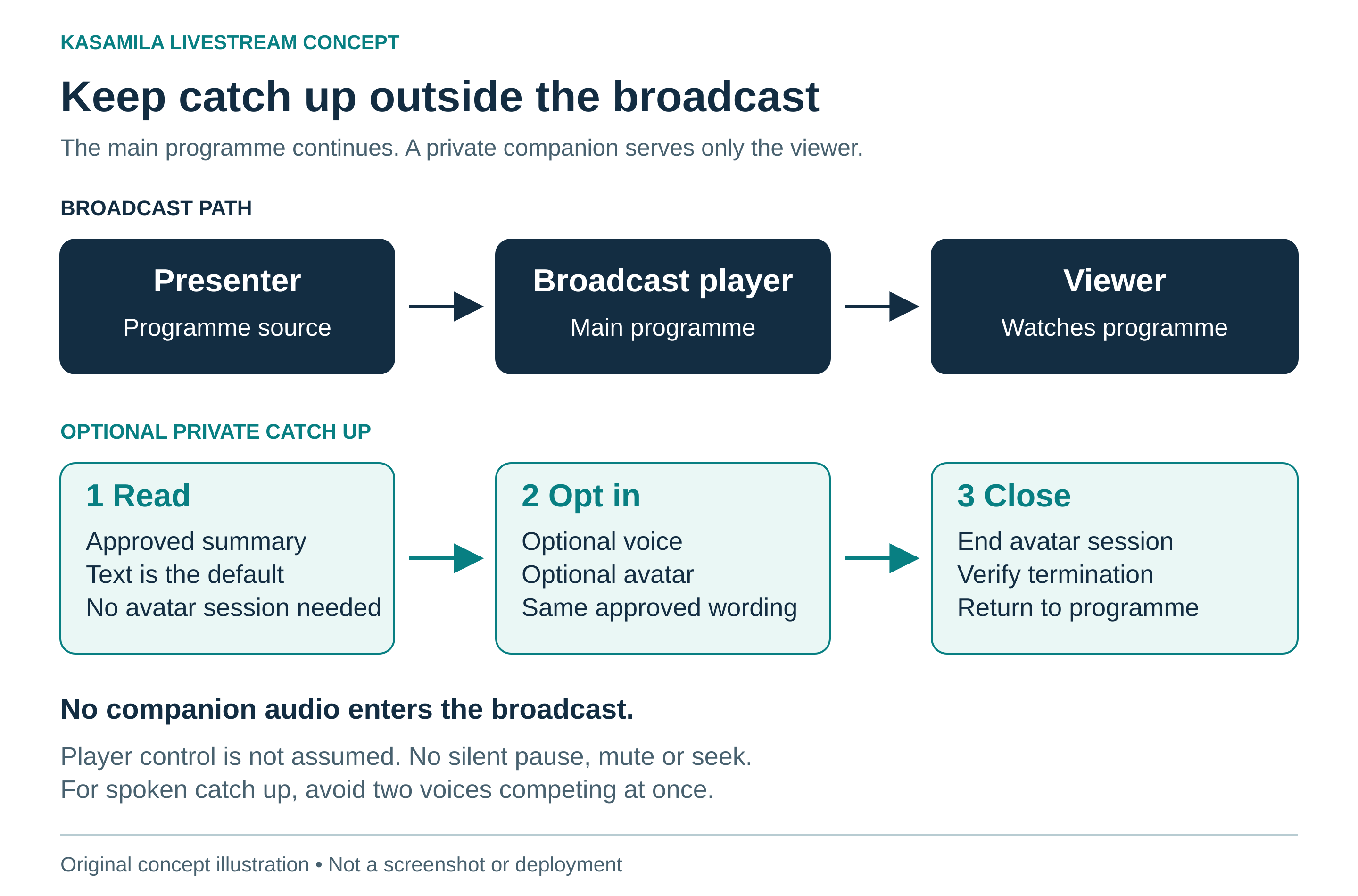
Figure 1 Keep private catch up outside the broadcast path
Original concept illustration. Not a screenshot or deployment.
Distinguish programme time from the viewer's position
“What is happening now?” sounds simple, but it can describe different moments. The producer may have moved to the next segment while a viewer is paused, delayed or watching a replay. A fresh server update is not proof that the viewer sees the same scene.
Give the application two separate concepts: the latest producer-approved programme state and the viewer's playback position, if that position is actually available through an authorised integration. Never manufacture the second from the first. Without reliable player context, say “Latest producer update” rather than “What you are watching now.”
A proposed update record should include the event identifier, segment identifier, approved summary, update time, version and status. Use explicit statuses for a live programme, a replay, an ended event and unavailable information. Define how long an update may be treated as current for this particular show; there is no universal freshness interval.
When a segment changes, replace the offered summary and cancel an unplayed response tied to the old version. If an answer is already speaking, stop it and show that a newer update is available rather than silently continuing a misleading explanation. Recheck on tab return and before each answer. If updates fail, show the last confirmed update with its time and an uncertainty notice, or withdraw it. A planned running order is not evidence that the plan happened.
For replay, use separately approved recap information and only verified chapter links. Do not offer live participation instructions after the event ends. Where no reliable chapter mapping exists, link to the replay overview instead of inventing a timestamp.
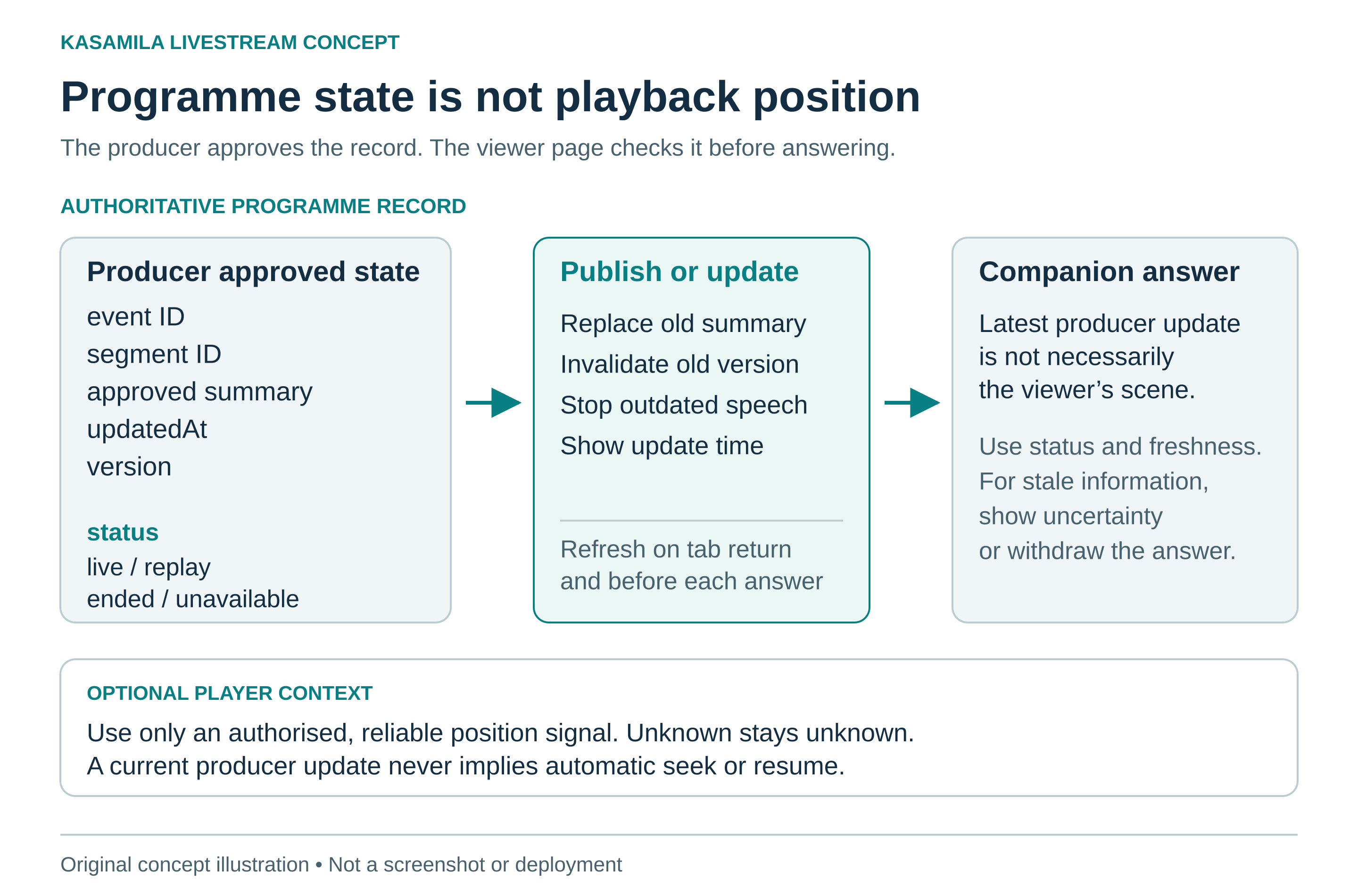
Figure 2 Programme state is not playback position
Original concept illustration. Not a screenshot or deployment.
Put Kasamila in the presentation layer
Kasamila's official portal positions its product as browser-driven avatar presentation. Its published runtime guide describes browser-side audio-driven animation and WebGL rendering, with audio inputs including files and streams. It documents a permanent key kept on the backend and a short-lived, scoped token for the browser. Those are published building blocks, not a ready-made viewer-onboarding service. [1][2]
In this design, the organiser owns the summaries, participation rules and update decisions. The event application owns the companion page, source checks, player-state handling, privacy controls and fallback. Approved recordings or a separate text-to-speech service supply the audio; Kasamila supplies the avatar presentation. Use the same approved wording for visible text and spoken output.
The public developer repository contains integration examples and states that its automated checks do not establish credentialed end-to-end production playback. [3] This proposal therefore makes no compatibility claim for a streaming platform, browser, device or media pipeline. Test the exact combination before inviting viewers. A public livestream example is not evidence of a private companion integration, synchronised playback, native moderation or audience-scale capacity.
Protect attention and avoid unnecessary collection
Keep the main programme as the destination. The companion should not add a feed, a stream of unsolicited tips or an obligation to converse. A viewer who needs one link should receive that link without sitting through a welcome speech. Avoid autoplay, camera requests and persistent identity requirements for a simple catch-up task.
Keep every answer available as readable text, with keyboard-operable controls and a clear focus order. Do not cover the programme's captions or essential visuals. W3C's media accessibility guidance discusses captions, transcripts, descriptions of visual information and accessible players; these are useful planning references, not a claim that this concept meets an accessibility standard. [4] Test the complete experience with representative viewers, including people who use assistive technology.
For an initial pilot, record limited operational events such as answer opened, return link chosen and session ended. A return-link click does not prove that viewing resumed. Do not collect chat histories, screen names or recordings merely because they might be useful later. If additional data or an external speech service is introduced, explain the actual data flow and retention choices before use. Browser-side avatar rendering does not make every connected service local.
Test whether the guide gives more attention than it takes
Use three matched versions: A offers text and links; B adds spoken playback to the same text; C adds the avatar to the same voice, wording and controls. B compared with A tests the effect of speech. C compared with B tests the visible avatar. All three retain the same accessible text route.
Keep each consenting participant in one assigned condition for the pilot, and balance conditions across comparable arrival points and devices. Record the event segments and update versions they encountered. If the event itself changes between groups, do not attribute every difference to the presentation. Choose the sample plan and decision criteria before reading the results; a small usability trial can identify failures without proving a general audience benefit.
Ask whether viewers correctly identify the segment and participation route, how long that takes, and whether they understand the next part of the main programme. That last measure matters: a successful catch-up answer can still be a bad intervention if it makes the viewer miss what follows. Track opt-outs, overlapping audio, stale answers, accessibility barriers and help requests. Count failed starts and unavailable updates, not just completed interactions.
Do not use longer companion dwell time as the goal. It may indicate confusion. Compare full cost per accurately completed onboarding task, alongside main-programme comprehension and viewer preference. Retain the avatar only if its added benefit justifies its extra cost and attention demand. The pilot must allow text to win.
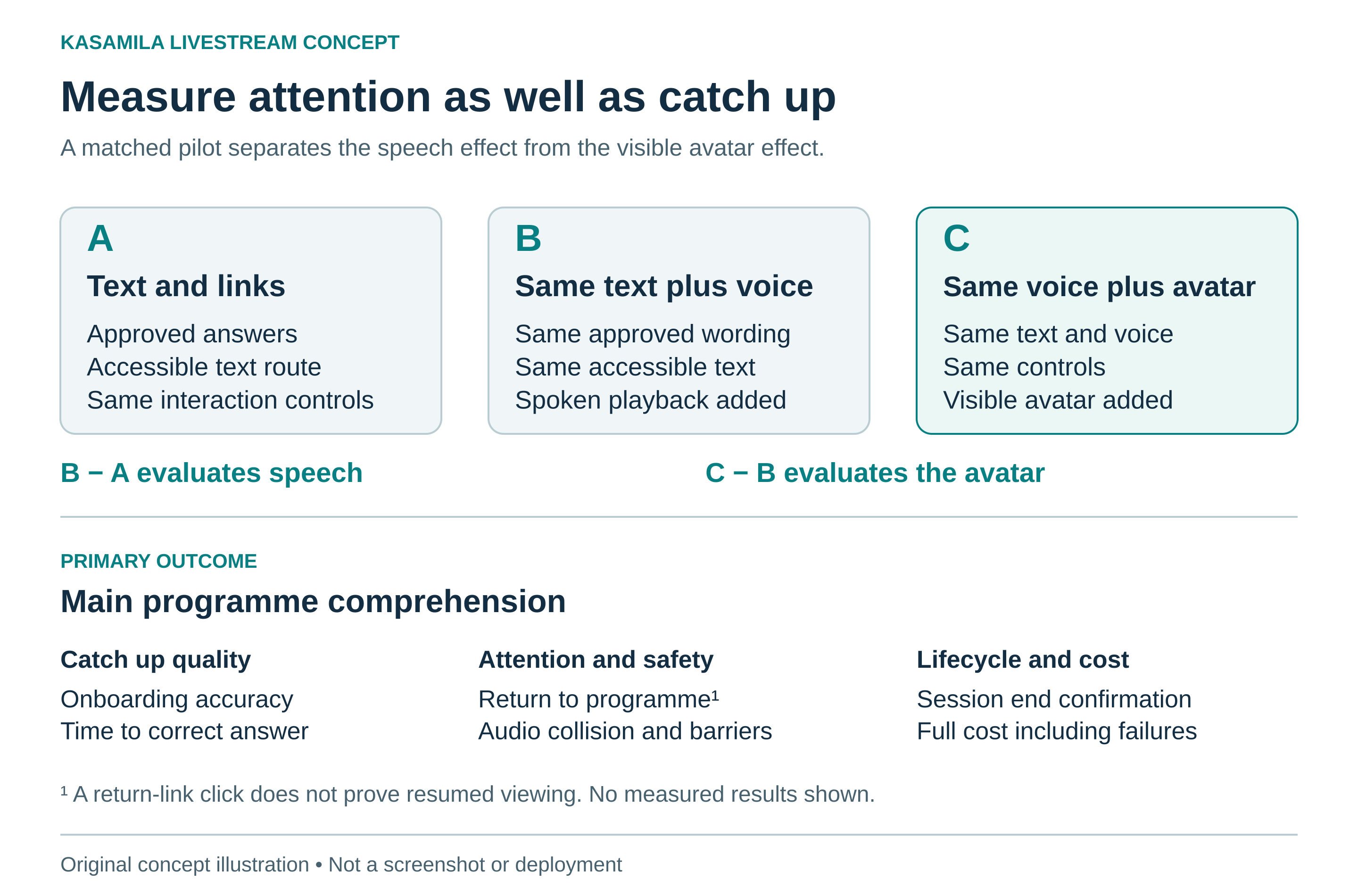
Figure 3 Measure useful catch up and the attention cost
Original concept illustration. Not a screenshot or deployment.
Budget per active viewer session
The runtime guide says ordinary API/SDK sessions accrue charges from creation, including listening, silence and hidden states. Muting or stopping audio does not end a session. Use the documented destroy or authorised session-end path and verify termination. [2] Kasamila's pricing page separates avatar runtime from speech recognition, voice generation and AI services. [5]
This private companion has a different cost shape from a single on-air avatar: each active viewer session needs its own accounting. Keep the default text page outside an avatar session and start the runtime only after the viewer opts in. Set appropriate duration and concurrency limits, provide text fallback when capacity is unavailable, and test cleanup after completion, inactivity, navigation and network failure. Do not assume that closing a tab confirms the session ended.
Include content updates, hosting, support, optional LLM, STT and TTS services, and failed attempts in the pilot budget. Track unconfirmed endings until reconciled. No numerical price, free-trial entitlement or audience-capacity promise is assumed here.
Rehearse before inviting viewers
Start with one event, a small approved answer set and a limited adult test audience. Rehearse a late arrival, a paused player, a replay, a changed segment, an unavailable update and an answer interrupted halfway through. Check that no companion audio reaches the broadcast and that text remains useful when the avatar is unavailable. Verify actual session endings rather than judging from the screen alone.
Give the producer ownership of programme updates, the integrator ownership of reliable delivery and lifecycle handling, and a named operator the ability to disable the companion while leaving the event available. Review incidents and results before expanding to another platform, language or event format.
The best catch-up guide may be the one a viewer closes quickly, with enough context to enjoy the programme. Kasamila is worth adding when its presentation helps that outcome, not when it simply keeps another character on screen.
Sources
Public sources checked 29 October 2026. Published documentation is distinguished from the proposed workflow above; no credentialed runtime or broadcast test was performed for this article.
[1] Kasamila official portal. Browser-driven avatar positioning and developer documentation entry point. https://www.kasamila.com/portal?lang=en
[2] Kasamila Runtime API and Web SDK integration guide. Browser runtime, audio inputs, backend-held key, scoped token and session lifecycle. https://github.com/kasamila/kasamila-dev/blob/main/docs/api_v1_runtime_integration_guide.en.md
[3] Kasamila developer repository. Public examples and limits of automated integration validation. https://github.com/kasamila/kasamila-dev
[4] W3C Web Accessibility Initiative. Making Audio and Video Media Accessible. https://www.w3.org/WAI/media/av/
[5] Kasamila pricing. Runtime metering and separate speech and AI services. No price or offer is quoted. https://www.kasamila.com/pricing?lang=en