An optional digital guide for the public library
How to test a browser avatar without putting another obstacle between a visitor and help
A visitor walks into a public library with a document on their phone. They can see a printer, a self-service machine and a service desk, but they do not know where to start. A large screen plays a welcoming animation. The useful question is whether that screen can help them take the next step.
For a library, a digital character should earn its place by making a small service task easier. It should not require a conversation to reach a floor map, turn a simple question into a performance, or stand in for a librarian when judgment is needed. This article proposes a narrow Kasamila pilot: optional, browser-based help for finding a collection, understanding a printing process, or locating a staffed help point. It describes a design to evaluate, not a deployed library product or a measured result.
Start with the moment of uncertainty
Library orientation has a distinctive challenge. Visitors arrive with different levels of familiarity, language confidence and comfort with technology. Some want to ask a question aloud; others prefer quiet instructions. Staff may need to spend time on an individual question while another visitor simply needs directions. An interface should make those routine directions easier to find without reducing access to people.
Choose three tasks for the first pilot. For example, explain the approved steps for sending a document to the library's existing print service; show the route to a collection using a maintained floor map; and explain where a visitor can ask for staff assistance. These are proposed task categories, not claims that Kasamila connects to a printer or library system. The library must choose actual tasks, approve the answers and confirm what is currently available.
Keep the boundary deliberately small. Do not ask visitors to enter library-card numbers, passwords, borrowing histories, personal documents or children's details. Do not let the character infer reading interests from a person's appearance or past activity. A pilot can evaluate useful public information without recognizing patrons or accessing accounts.
Design a short journey with an easy exit
The idle screen should show a plain menu and a visible map, with the option to start an AI-guided explanation. It should not open a continuously listening conversation simply because someone walks past. Label the guide as automated and explain that staff remain available.
A visitor can select “How do I print?” by touch or keyboard, or opt into voice where the environment and permissions allow it. The application retrieves a library-approved instruction card. It then shows the numbered steps and, if the visitor chose the avatar mode, supplies spoken audio to the browser avatar. Text stays available even if speech is unsuitable or fails. Audio should be optional in a shared quiet space, and a headset arrangement needs its own operational and accessibility assessment.
The instruction should finish at a concrete next action: open the existing print-service page, go to a named service point, or ask staff. The guide must not claim a print job was sent, a book is available, or a reservation is complete without an authorized system response that actually establishes that fact. Such transactional integration is outside this initial pilot.
If the content is missing, outdated or uncertain, the response should say so and show the staff route. On completion, the visitor sees “End help” and returns to the ordinary menu. The application must explicitly end the API session and confirm closure. Silence, muting, hiding the avatar or stopping audio is not an adequate shutdown procedure.
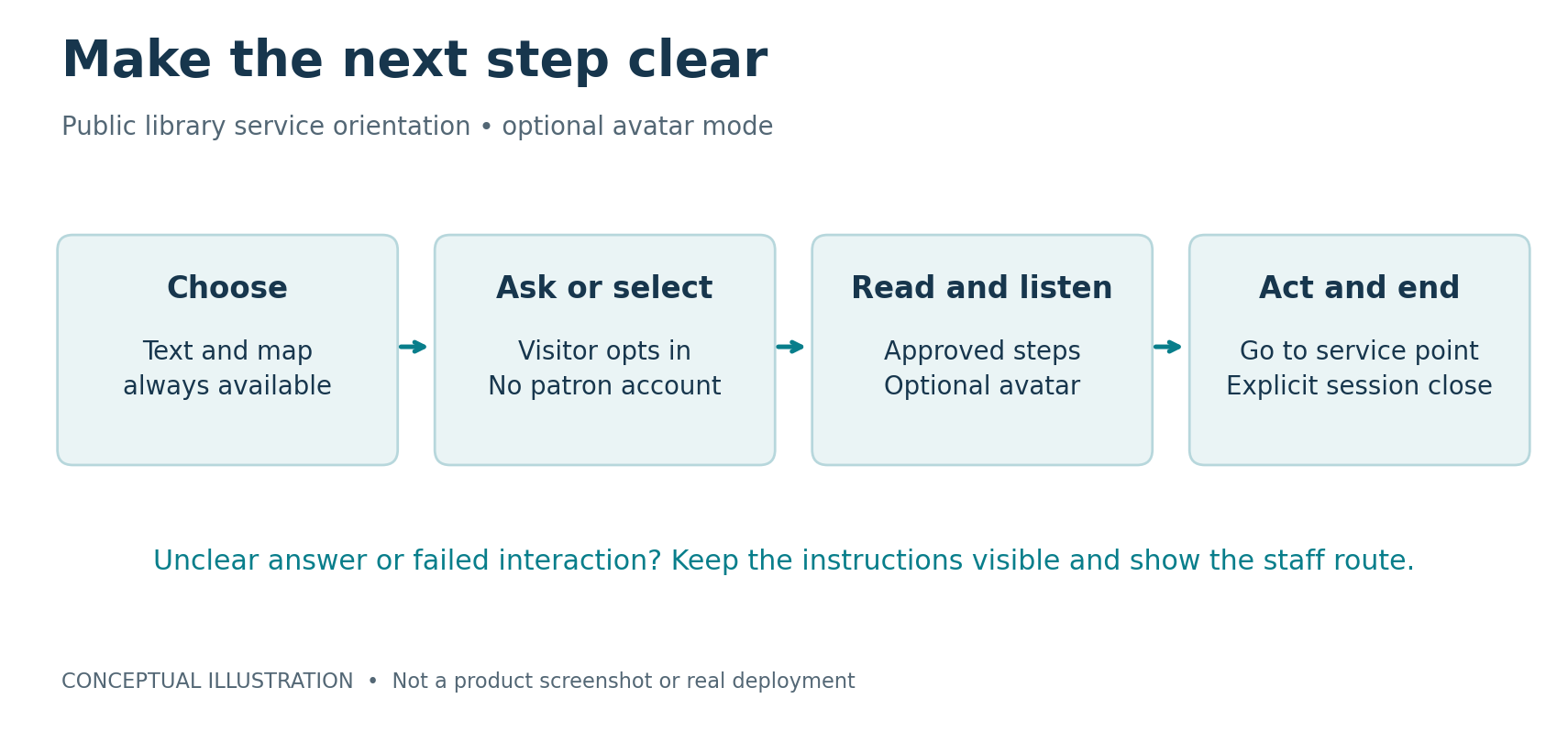
Figure 1: A short visitor journey. Conceptual illustration, not a product screenshot or deployment.
Give each system one clear job
Kasamila's public integration guide describes browser-side avatar rendering driven by audio, with documented input paths including audio files, PCM streams, TTS output and RTC audio. Its MCP interface supports server-side session orchestration; it does not generate the answer, call the language model or perform text-to-speech. The application still needs to supply those functions when the experience requires them. [1, 2]
For this pilot, the library owns the service instructions, floor map, accessibility requirements and escalation destination. An application layer selects approved content, displays text and manages the visit. A speech stack, if used, handles speech recognition and synthesis. Kasamila supplies the documented avatar runtime path. Staff handle exceptions and service decisions. The printer, catalog and borrowing system remain in their existing workflows.
Begin with fixed approved instruction cards rather than unrestricted question answering. If free-text questions are added later, constrain answers to maintained sources, include a visible text answer, and route unsupported questions to staff. A friendly expression is not evidence that an answer is correct. The design should make the source and next action easier to understand, not use the character to disguise uncertainty.
Permanent API keys belong on a trusted backend. The official guide describes scoped, short-lived browser tokens. Provisioning credentials or changing persistent access is a separate authorized implementation step, not something accomplished by this article. Public examples and mocked tests are useful references, but they do not establish a production end-to-end connection to a library vendor, native device support or a certified kiosk deployment. [2]
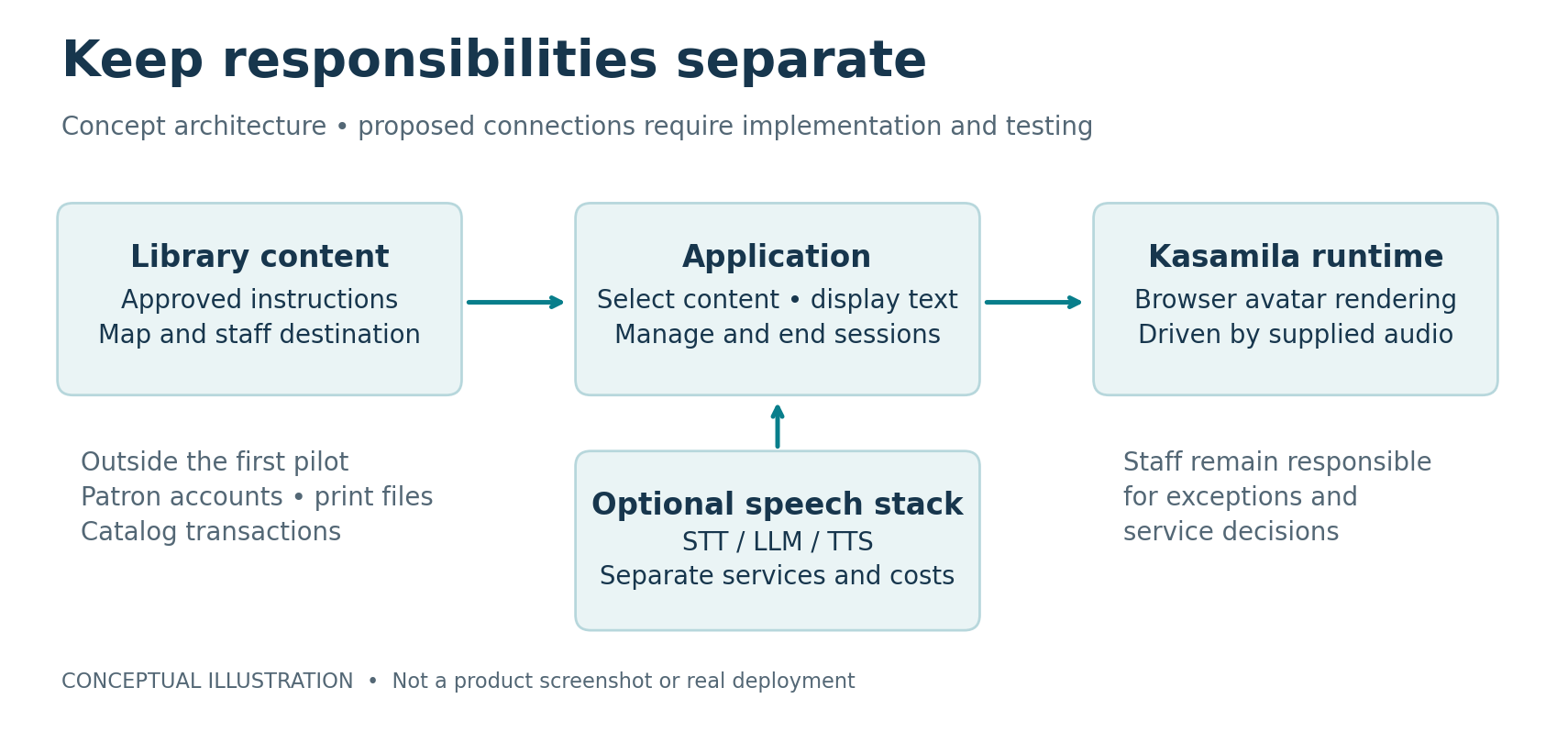
Figure 2: Responsibility boundaries. Conceptual architecture; the proposed library connections are not implemented or certified.
Build around access rather than spectacle
W3C's accessibility principles emphasize text alternatives, captions where relevant, operable controls, keyboard access without trapped focus and ways to control moving content and audio. These are useful design requirements for the proposed browser experience, not proof that a particular kiosk meets an accessibility standard. [3]
Make the same instructions available without an avatar and without speaking. Use readable text, clear focus states and controls that do not disappear while someone is reading. Avoid placing essential information only in animation or speech. Provide a way to stop the character while keeping the instruction card. Test screen-reader use and keyboard navigation, then assess the physical installation separately: reach, viewing angle, glare, sound and the route to staff cannot be validated by a browser screenshot.
The American Library Association recommends understandable privacy notices and removing traces of individual use from shared computers. Apply that principle to this proposal with a plain-language notice, minimal technical logs and a reset that clears the previous visitor's displayed interaction. These design choices do not by themselves establish legal compliance. [4]
Do not assume every public display can run the experience. Validate one specific device first. Record its operating system, browser or WebView version, graphics capability, audio output and optional microphone, network behavior, power configuration, screen resolution and kiosk-mode restrictions. Check what happens when the browser loses focus, goes into the background, sleeps or restarts. The documented browser rendering path is not evidence of universal hardware compatibility or offline operation.
Connect in a sequence that keeps failures visible
First, agree the three tasks, who maintains each instruction, and when the information expires or must be reviewed. Use a visible revision date internally and provide a fast way for staff to remove an outdated answer. Second, build and test the plain text and map interface. It becomes both the comparison baseline and the fallback.
Third, add the optional voice-only path using the same approved content. Fourth, connect the avatar to that same answer audio through a documented Kasamila integration path. Keep business logic out of the character layer. This makes it possible to isolate whether the visual character adds value rather than comparing two different help services.
Fifth, run fault tests on the actual device: denied microphone permission, no sound, network loss, interrupted audio, stale content, browser reload, a visitor walking away and a session-close failure. The safe result is a readable fallback with a staff route, not an indefinite listening screen. Log the minimum technical events needed to detect failures and confirm sessions close. Avoid storing raw patron audio or question transcripts by default; any later collection needs a defined purpose, access controls and retention decision.
Finally, let staff and representative visitors try the tasks before a limited public evaluation. Approve operational ownership for cleaning, volume, availability notices, content corrections and recovery. A pilot needs someone responsible for the screen after the first successful demonstration.
Measure the contribution of the character
Compare three versions: text and map only, the same content with optional voice, and the same voice with the avatar. Keep task wording, content, device and staff fallback comparable. Allocate eligible test sessions across versions rather than giving the newest version only to enthusiastic volunteers. Participation should remain optional. Record when someone declines the interaction, because avoiding a screen can be an important result.
Use task completion as the main outcome: can a visitor identify the correct next action without an incorrect instruction? Measure time to that action, requests for staff help, failed or abandoned sessions and accessibility problems. Separately ask whether the explanation was clear and whether the character was helpful, distracting or unnecessary. More dwell time is ambiguous: it may reflect engagement or confusion. Fewer staff requests is not automatically better if a visitor should have been referred.
Set the decision criteria before testing. For example, require no increase in incorrect guidance, acceptable accessibility findings and a practical improvement in the chosen completion measure relative to voice alone. The library should choose the thresholds and sample size for its context; no universal percentage is claimed here. If text performs as well or better, retain the simpler interface. If voice helps but the avatar does not, that is also a useful outcome.
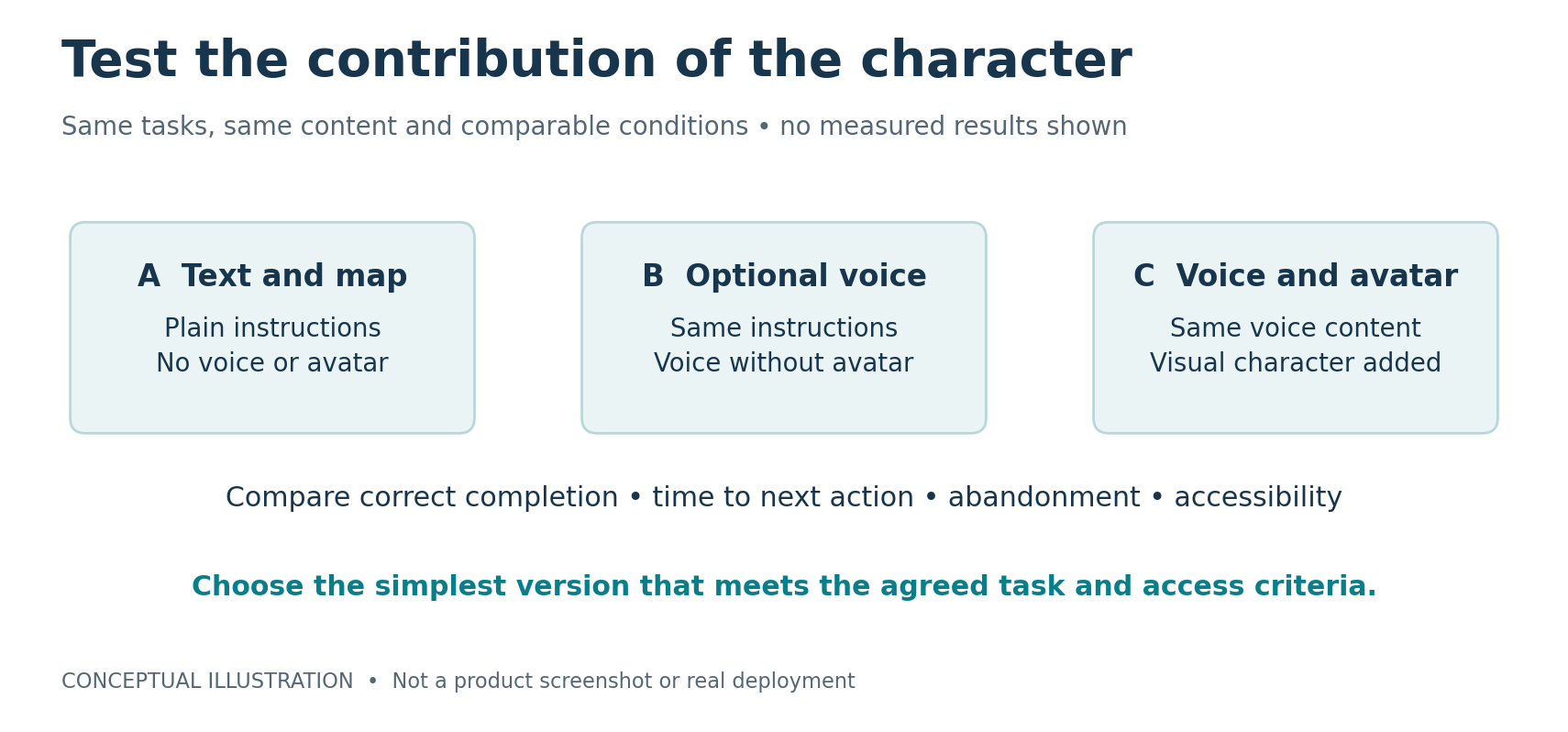
Figure 3: A fair three-way comparison. Conceptual experiment design; no measured results are shown.
Control costs by controlling the session
Budget the entire API session, not just the spoken answer. Kasamila session runtime includes running, listening and silent time until the session is explicitly ended. LLM, speech-to-text and text-to-speech costs are separate. Verify the current plan, quota and terms in the Portal when implementation is approved; this article does not lock in a price or trial entitlement. [1, 2]
A useful pilot cost model is total billable avatar time plus speech and model usage, application hosting, content maintenance and staff support. Divide that total by successfully completed help tasks, not by the number of animated greetings. Do not treat a silent or failed interaction as free.
Create a session only after the visitor chooses that mode. Provide a clear end button, a suitable inactivity timeout and a maximum session duration, with an accessible warning before ending. Implement backend cleanup and reconciliation for sessions whose browser disappears, and verify actual closure rather than relying only on a local UI message. Set a usage budget and a fallback when it is reached. During the pilot, review unexplained long sessions and close failures alongside task outcomes.
The decision is about useful help
An optional digital guide deserves a place in a library when it helps people act with less uncertainty while preserving privacy, accessibility and access to staff. Kasamila offers a documented browser-avatar component for evaluating that possibility. The library experience, reliable information and evidence of incremental value still have to be designed and tested.
Start with one device, three public-information tasks and the ordinary menu always available. The most valuable pilot result may be a clear boundary: where a character helps, where voice alone is enough, and where a librarian should take over.
Sources
[1] Kasamila Portal, current product entry point. [2] Kasamila official Runtime integration guide. [3] W3C Web Accessibility Initiative, Accessibility Principles. [4] American Library Association, Library Privacy Guidelines for Public Access Computers and Networks.