
A Hotel Reception Pilot for Guest Questions and Wayfinding
An illustrated implementation concept for hotel operators and integration partners. This article proposes a pilot; it does not describe a deployed customer solution or measured results.
A guest arrives with a simple question: “Where is breakfast?” The receptionist is helping someone resolve a booking issue. A lobby display could answer the first question and show a route while leaving the receptionist available for the conversation that needs their judgment.
That is a practical starting point for a Kasamila hotel reception pilot: a visible digital host for public hotel information, directions and a clear route to staff. Success should mean that guests find the right answer with less effort. Whether an avatar helps achieve that better than voice alone or a touch menu is a question to test.
Start with the questions that interrupt reception
Breakfast hours, the location of a meeting room, the route to the fitness center and where to find the concierge are small requests. When several guests need them at once, they compete for attention with more complex work. Static signs can help, but a guest may not know which sign to look for. Spoken answers can help too, although lobby noise and language preferences can make them difficult to follow.
A bounded pilot can offer a spoken answer alongside a readable answer card and a simple map. It should also let guests tap common topics without speaking. The initial content should be information the hotel is comfortable displaying publicly: opening hours, public-area directions and published service information.
Keep booking changes, identity checks, room allocation, payments and guest-specific records outside this pilot. Even a question about checkout can cross that boundary: the published checkout time is public information; whether a particular guest has late checkout requires staff. Avoid requests for names, room numbers, reservation references or payment details.
Design a short guest journey
The idle screen can show a static welcome, three common questions and a clear “Start” button. A guest chooses a language and either taps a topic or deliberately enables voice input. Make the microphone state obvious. Provide text and touch throughout, with a visible “Staff help” option on every screen.
For an in-scope question, the application retrieves the hotel-approved answer. The digital host speaks while the screen shows the same answer and, where relevant, a floor-plan direction. A map should use approved routes and landmarks rather than generated guesses. An accessible route should appear only when the hotel has verified it.
When information is missing, ambiguous or guest-specific, the screen should explain that staff can help and show the staffed location. A staff notification is an optional hotel-side integration to build and test; this concept does not assume an existing connector. Only show “Staff notified” after the receiving system confirms it. If nobody is available, display the hotel's approved alternative.
The guest can end at any point. On “Done,” timeout or handoff, stop capture, terminate the runtime session and clear the visible conversation. A useful pilot treats its ending as carefully as its greeting.
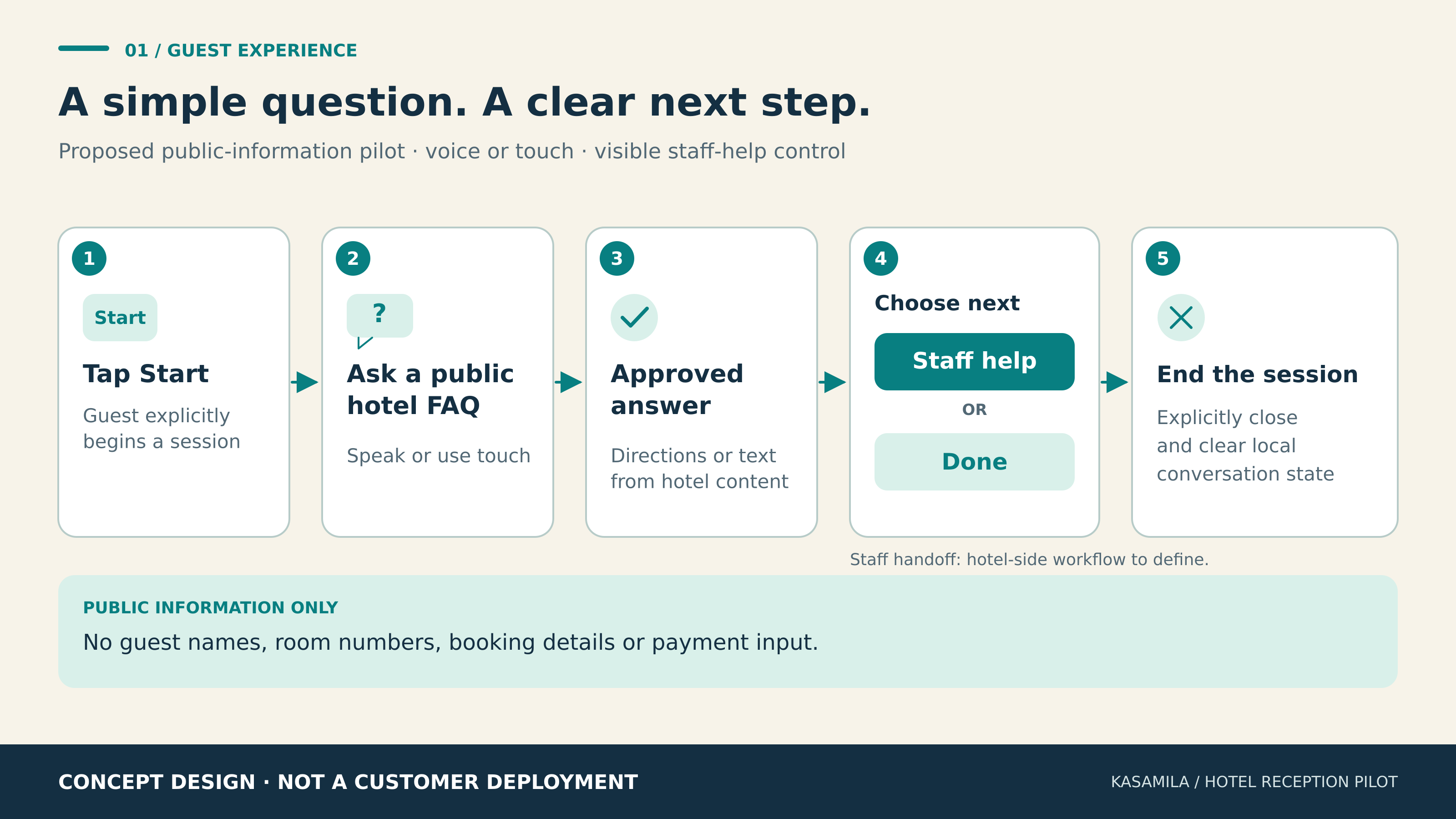
Figure 1. Proposed guest journey. Concept design, not a customer deployment.
Place Kasamila inside the application
Kasamila's public documentation describes browser-based avatar inference and rendering, with audio inputs including files, PCM/TTS streams and RTC tracks. Permanent API keys stay on the application backend, while the browser receives a short-lived runtime token. This supplies the avatar layer; the hotel application still needs to control its content, interface and service workflow. Runtime integration guide
For a first pilot, approved answers and prerecorded audio may be sufficient. A more flexible version can add speech recognition, retrieval, answer generation and text-to-speech. Those components require separate selection, integration and cost checks. An LLM is optional, and its output should be constrained to approved hotel content with a fallback when the answer is unavailable.
The proposed architecture keeps the hotel knowledge source and business rules under hotel control. Its backend authorizes kiosk sessions and coordinates any speech or answer services. The browser presents the avatar, answer card, map and controls. The integrator also owns production template-media hosting and delivery under the documented HLS model. Geometry and media guide
Kasamila's product team confirms HD, multiple aspect ratios and private-deployment options. Choose the display layout and deployment scope during technical discovery, then validate them on the intended hardware and network. These options do not establish a tested hotel integration, an offline guarantee or a promise that every third-party speech service runs privately.
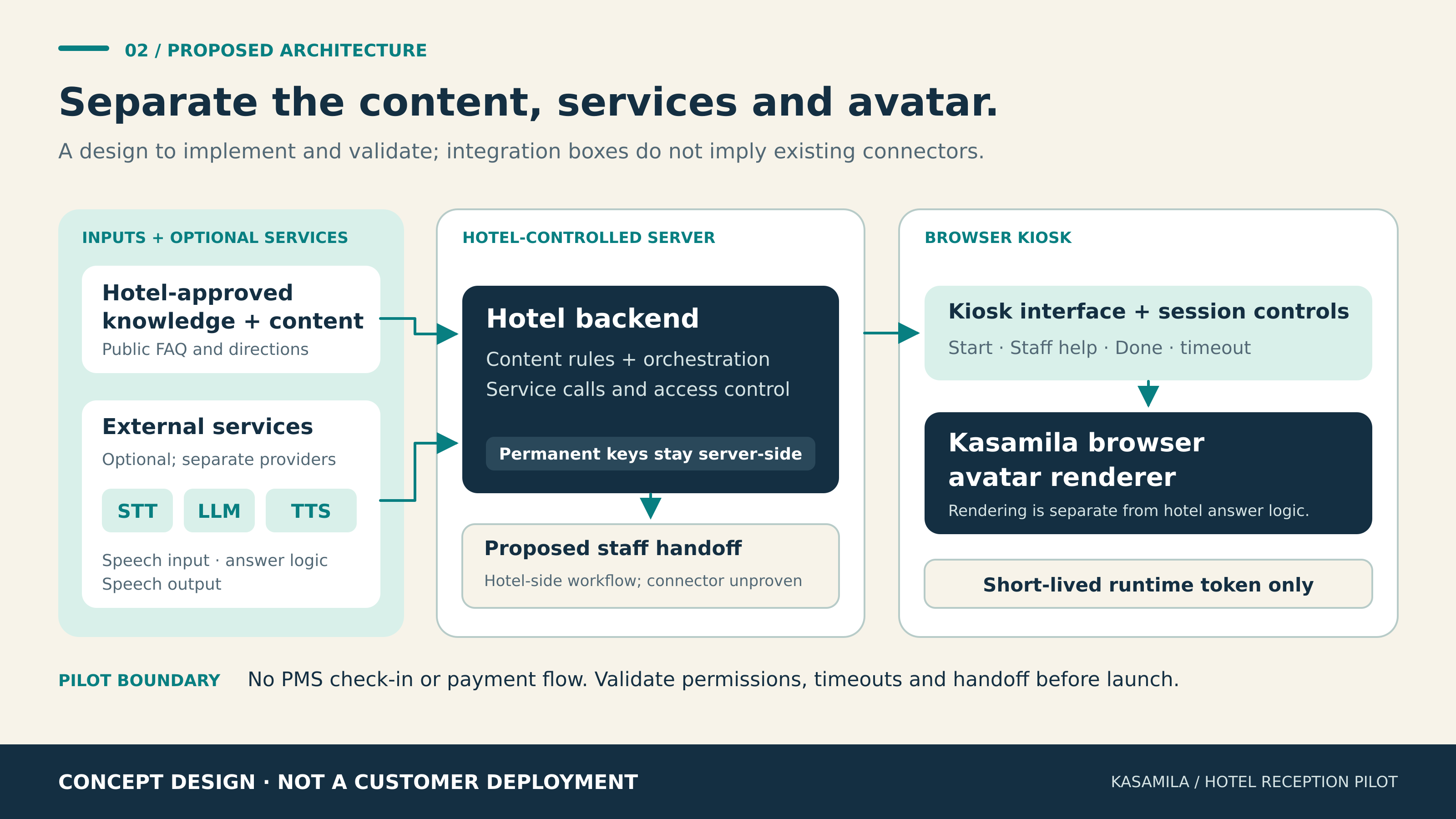
Figure 2. Proposed integration responsibilities. Hotel workflows and external services require implementation and acceptance testing.
Give each part an owner
The reception or operations lead owns the answer set: what is in scope, which directions are correct, when opening hours change and when a question must go to a person. A named content editor should approve each update and record its review date. Temporary changes, such as a closed corridor, need a prompt removal or replacement path.
The integration team owns kiosk authorization, token issuance, interface behavior, media delivery, session cleanup and fallback screens. It should grant only the required audio-input modes, restrict the allowed web origin and avoid exposing permanent keys in the browser or logs. The current developer handbook also calls for teardown, expiry and network-recovery testing. Developer handbook
The hotel service team owns the handoff: where a guest goes, who receives an optional alert and what happens if the first contact is unavailable. IT owns the device, network, browser configuration and operational monitoring. Privacy and accessibility reviewers should assess the actual data flow and guest interface before a public trial.
Browser rendering alone does not establish that the whole conversation stays on the device. If microphone audio is sent to an external speech service, that is a separate data flow. Prefer aggregate operational events for the pilot, avoid raw audio or transcript retention by default, and document any justified exceptions and retention settings. These are design requirements to implement, not built-in compliance claims.
Budget for the entire session
Session design affects both usability and cost. The current runtime contract meters ordinary API/SDK sessions from creation using server elapsed time, including listening, speaking, silence and hidden pages. Stopping audio does not stop billing. Explicit destruction or the authorized session-end operation settles the session and returns unused reserved time; an unended lease can consume its full duration. Runtime release contract
Keep the attract screen outside an active session where feasible. Create a session only when the guest begins; end it on completion, inactivity or a failed start. Test cleanup when a browser tab closes, a network connection drops or the kiosk restarts. A browser close event alone is not a reliable operational control, so design backend reconciliation and bounded leases as well.
For planning, calculate avatar runtime from session elapsed time, then reconcile with the actual usage ledger. An illustrative 100 sessions averaging two minutes represent 200 runtime minutes, including listening and pauses. If those same 100 sessions each consumed a full five-minute lease after failing to end, they would represent 500 minutes. This is arithmetic, not measured traffic, a price quote or a billing-rounding guarantee.
Add separate line items for STT, LLM and TTS services where used, template creation, concurrency capacity if needed, media hosting, devices, support and integration work. Track cost per successfully resolved in-scope request, along with total cost, so an attractive demo does not hide an expensive service path.
The public portal currently advertises one free API/SDK hour for new accounts, valid for 30 days after registration, with private-template credits purchased separately. Signed-in portal previews are free. Current purchasable plans and prices are available in the signed-in catalog, so this article does not quote a unit price. Recheck terms before starting a pilot. Kasamila portal
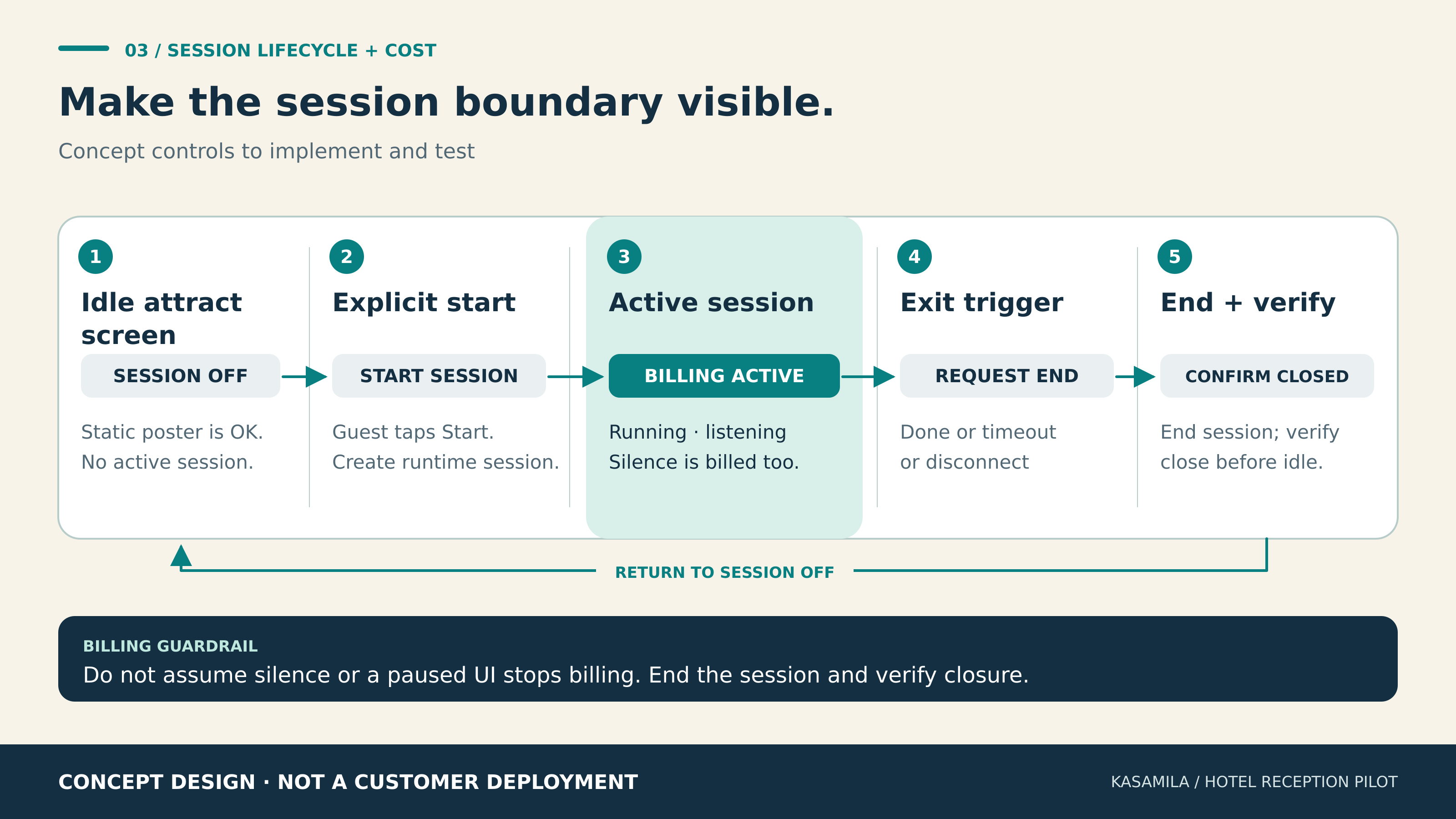
Figure 3. Proposed lifecycle controls. Running, listening and silence count while the session remains active.
Compare the avatar with simpler options
Run the pilot on one reception device during matched operating periods. Compare three variants using the same approved answers, placement, language choices and staff-handoff policy:
- A touch menu with text and map answers
- A voice interface with the same text and map answers
- The same voice interface with a Kasamila avatar added
The voice-only comparison helps isolate the effect of the avatar; the touch comparison tests whether conversational input helps the task. Rotate or randomize variants where practical. Record time of day, noise conditions, question mix and whether a participant has tried the system before. Count both opportunities to use the kiosk and interactions that actually start, so adoption and task success are not confused.
Agree on definitions before collecting data. Measure correct completion for in-scope questions, time to a usable answer, abandonment, repeated questions, accessibility problems and successful handoff. Check answer accuracy against the approved content. Record speech-recognition failures separately from avatar rendering or audio failures. Report typical and slower-tail response times, plus staff effort including content upkeep and troubleshooting.
For economics, compare total operating cost and cost per correct completion across variants. For session hygiene, compare billed time with intended interaction time, unended sessions and concurrency errors. A longer conversation may represent engagement or confusion; it is not automatically a positive result.
Set the acceptance thresholds with the hotel before launch rather than adding favorable targets afterward. If the avatar does not improve a guest outcome enough to justify its added cost and maintenance, retain the simpler experience or revise the use case. No ROI or reception-efficiency gain is assumed here.
Build a controlled first release
Begin with a small, reviewed answer set and a walk-through of the exact public areas it describes. Prototype the three interface variants, then test on the actual kiosk with the intended browser, screen orientation, speakers and microphone. Check subtitles, touch reach, contrast, language accuracy, noisy-lobby behavior and recovery after interruption.
Before guests use it, rehearse outdated content, an unknown question, microphone refusal, unavailable staff, exhausted runtime quota and network failure. Confirm that the fallback remains useful and that sessions actually end. The current docs identify SDK 2.1.0, but integrators should verify the production release registry and complete application acceptance for the version they select. Developer resources
A sensible first release helps a guest find a public place or understand a public service, then lets them leave cleanly or reach a person. The pilot's value will come from correct information, a usable journey and evidence from the comparison. Kasamila can be evaluated as the visual part of that experience.