
A coworking visitor guide built with Kasamila
A browser pilot for finding the right place and reaching reception
A visitor arrives at a shared workspace for a meeting. Several companies use the same address. The invitation names a room, but the visitor does not know where to wait, how to request guest Wi-Fi or whom to ask when the host is delayed.
A useful digital guide could answer those first-arrival questions using information approved by the workspace operator. Kasamila can provide the audio-driven avatar in a browser experience that combines short answers, readable directions and a clear route to reception. The pilot should test whether visitors understand their next step and reach the right place with less confusion.
This is a proposed, information-only design. It is not a customer deployment, a claim of kiosk compatibility or a report of measured savings. Visitor registration, identity checks, booking changes, payments and door access remain outside its scope.
Solve an orientation problem the operator can verify
Before building, observe the reception area and review de-identified question categories with staff. Do visitors confuse similarly named rooms, approach a member-only area or interrupt hosts for basic directions? These are hypotheses to check at the selected site, not findings about every coworking space.
Choose a few tasks that have stable, operator-approved answers. Suitable examples include finding the visitor waiting area, locating a public meeting zone and learning how to request guest Wi-Fi. Explain the approved connection procedure without requesting or displaying network credentials.
Shared buildings need clear information boundaries. The guide should use only routes and details approved for visitors. A room name alone must not reveal a tenant's private floor plan, current occupancy or meeting attendees. If a question could refer to several locations, show the approved choices or send the visitor to reception.
Follow the visitor rather than the conversation
The proposed browser kiosk begins with a quiet screen offering directions, visitor information and reception help. It identifies the guide as AI. Visitors can use touch or text without starting an avatar session; voice is an explicit choice.
A visitor asks, “Where should I wait for my meeting?” The application retrieves the current visitor-arrival procedure and shows the designated waiting location on a simple approved card. If voice is selected, the same answer is spoken through the avatar. The card stays visible while the visitor checks the direction. It should never require remembering a long spoken route.
The visitor then asks, “Is my host here yet?” That needs information the pilot does not hold. The guide says reception can help and gives the approved contact route. It does not guess the host's whereabouts, search a member directory or announce that someone has been notified.
If a staff messaging connection is added later, show the short question summary before the visitor chooses to send it. Display receipt only after the staff system acknowledges it. A received message does not establish that the host has seen it or is on the way. A first pilot can simply direct the visitor to the staffed desk.
When the visitor chooses Finish, the application stops microphone capture, ends the runtime and clears the visible conversation. The next person starts fresh. Screen reset and backend deletion are different operations; the operator's retention notice must describe what actually happens.
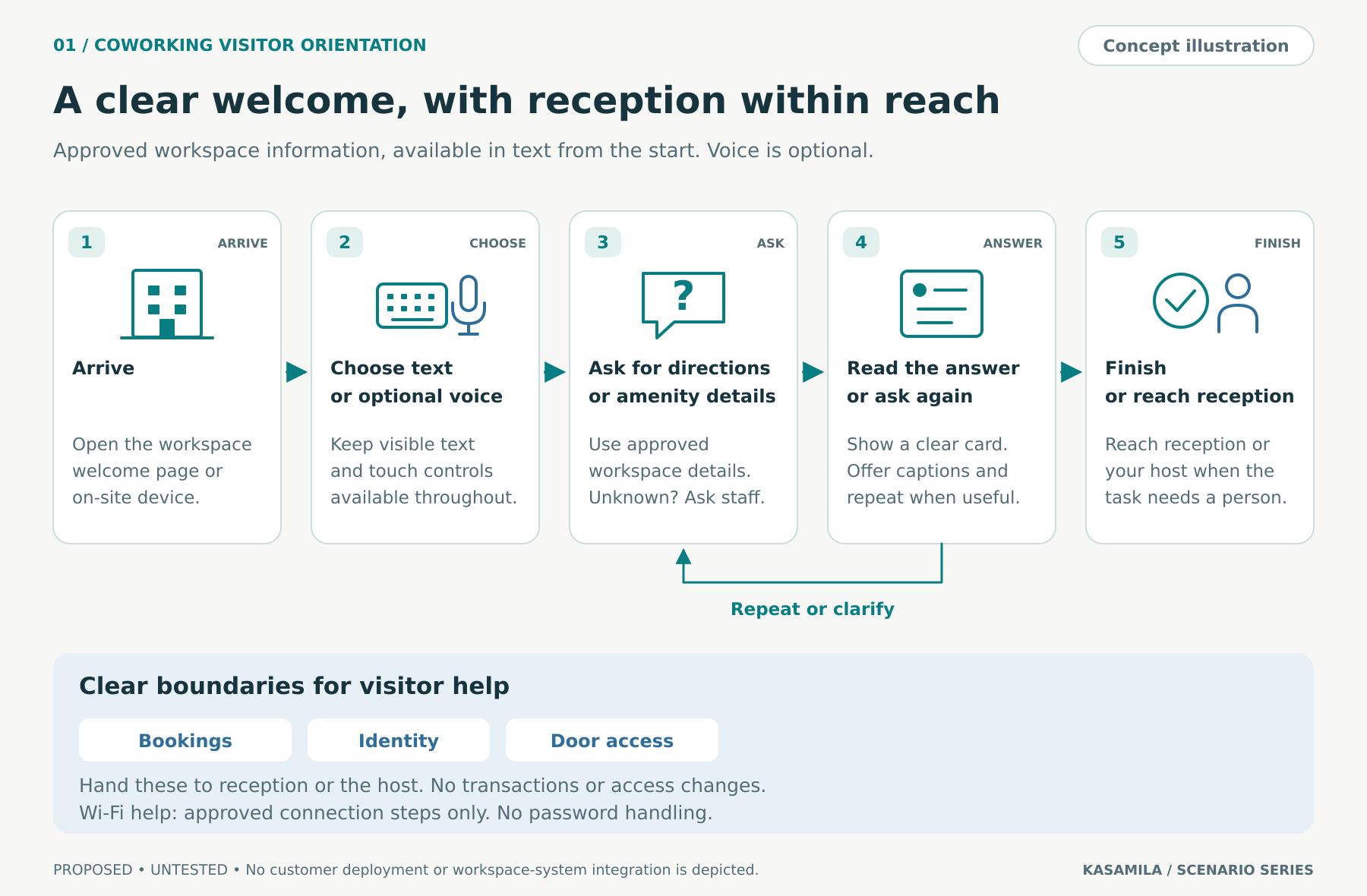
Figure 1. Proposed visitor journey. Concept illustration, not a product screenshot or customer deployment.
Keep the workspace and avatar responsibilities separate
Kasamila's public documentation describes browser-side, audio-driven avatar inference and rendering. The documented authorization pattern keeps the permanent API key on a backend and gives the browser a short-lived runtime token. Public audio-bridge examples provide paths for supplied reply audio, while the selected provider and audio pipeline still require testing. [1][2][3]
The workspace application would own approved content, retrieval, dialogue, direction cards and any staff handoff. Speech recognition, a language model and text-to-speech are separate components. Kasamila renders the avatar from the reply audio; a connection to member management, room booking or access control would require separate work and is excluded from this pilot.
Use the same approved answer for the visible card and spoken response. Select one audio playback owner to avoid duplicate sound. Review any translations and test the chosen speech services; an avatar alone does not establish multilingual accuracy.
The public audio-bridge examples are integration groundwork, not a complete provider adapter or a tested coworking system. A mock conversation cannot establish end-to-end operation on the intended kiosk. Test the actual browser, graphics capability, microphone, speaker placement, network and lobby conditions.
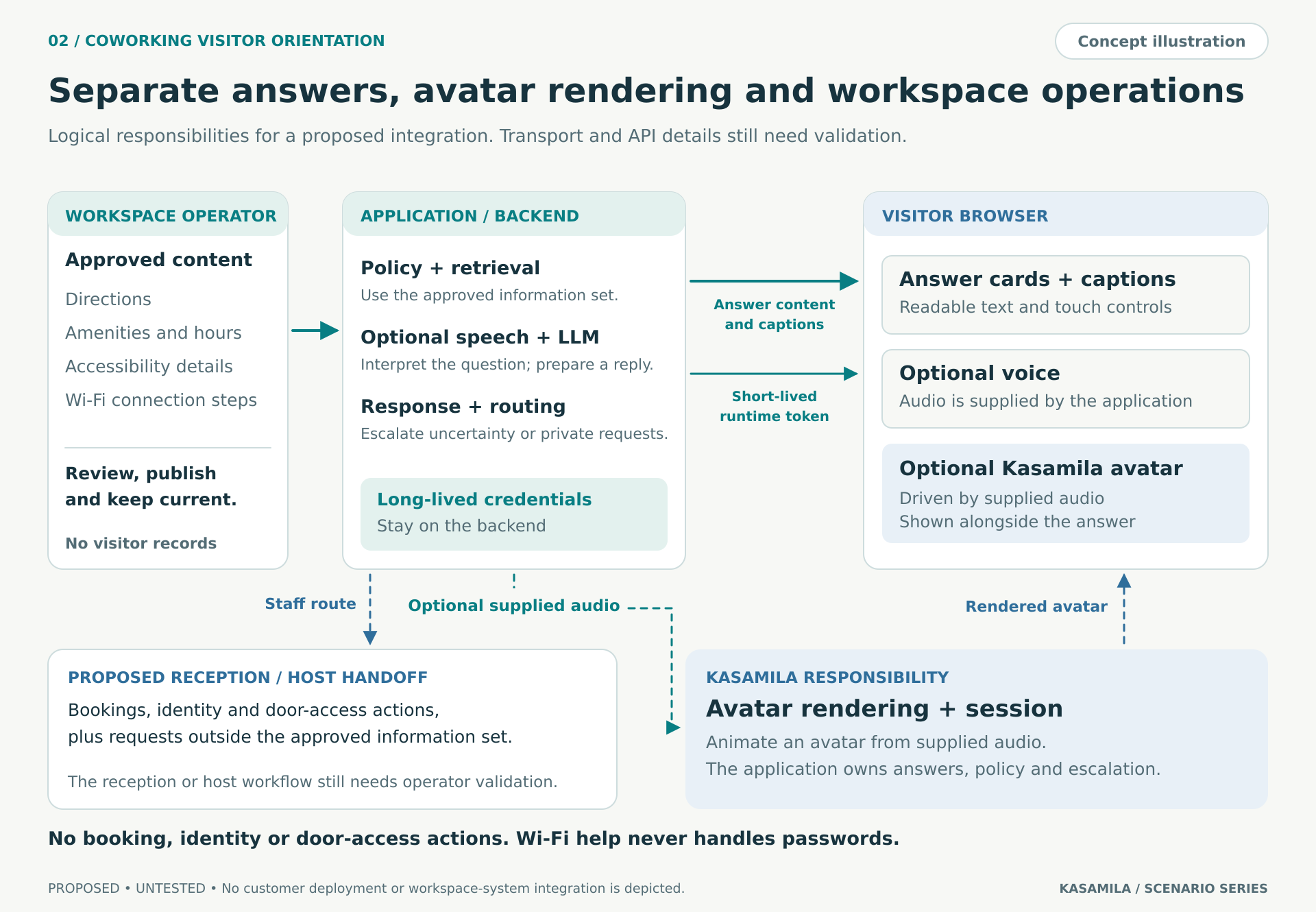
Figure 2. Proposed responsibilities and data flow. Connections require implementation and testing; no booking or door-access integration is implied.
Build a small pilot with clear owners
Begin with the content model. Each answer needs a site identifier, visitor-permitted scope, source, effective date and responsible owner. Room renaming, construction and temporary reception moves should invalidate affected directions. When sources conflict or expire, show the current reception route rather than generating a new path.
Build the cards and reception route first. Add text entry, approved language choices, readable focus states and clear Finish, Repeat and Stop speaking controls. A visitor must still be able to finish the task when audio is unsuitable for the shared space.
Then implement backend authorization and the avatar lifecycle. Restrict permitted origins and templates; follow the current session descriptor and media requirements. Add the optional speech path and cancel obsolete replies when a question changes. Never put a permanent API key in the kiosk page. [1][2]
Before inviting visitors, test ambiguous room names, outdated routes, a denied microphone permission, an interrupted reply, missing staff acknowledgment, network loss and a visitor walking away. Verify both session termination and isolation between consecutive users. A successful demonstration on one laptop is not a compatibility claim for every kiosk.
Assign operational ownership before launch. The workspace operator approves visitor information and routes. Reception defines handoff destinations and service hours. The implementation team owns credentials, application behavior, speech services and monitoring. A pilot owner reviews errors, accessibility findings and the full cost before expanding the scope.
Make a shared screen safe and usable
The initial flow does not need a visitor's name, email address, host's name, meeting details or access code. Avoid collecting them. If someone volunteers private information, do not repeat it aloud; offer a private conversation with reception. Configure collection, redaction and retention across the application and its providers. Browser-side avatar rendering does not make separately hosted speech processing local.
For optional voice, explain when the microphone is active and which services receive audio or text. Test a deliberate push-to-talk interaction rather than an always-listening lobby device. Browser microphone access needs a secure context and permission; denied access must leave a working text path. [4]
Provide readable text equivalents, contrast, keyboard navigation, a logical focus order and audio and motion controls. Test screen reach, glare and sound at the installation. WCAG is a useful web-accessibility framework; these features alone do not establish conformance or certify a physical kiosk. [5]
Test whether the avatar adds useful value
Compare three conditions. A offers touch or text cards. B adds conversational voice to the same cards. C adds the avatar to the same voice experience. Keep approved information, task difficulty, script, voice, captions and reception availability comparable. C versus B estimates the avatar's added contribution; B versus A evaluates the voice-and-conversation package.
Start with consented, supervised tasks whose answers the operator can verify. Can the participant identify the correct visitor waiting area and explain the next step? Record an observer's assessment separately from the participant's confidence. A “Helpful” response does not prove that someone understood the direction.
Randomize assignment within comparable language and time-of-day groups where feasible. Count failed starts and abandonment in the assigned-session totals. Set the sample plan and decision thresholds in advance; an initial feasibility test can reveal failures without proving a reliable improvement. [6]
Track correct resolution without staff correction, time to a useful answer, wrong or unsupported directions, abandonment and accessible completion. Record appropriate reception handoffs separately from resolved information tasks. For messaging, distinguish acknowledgment from the subsequent staff response. Include staff time spent assisting visitors, correcting answers and maintaining content.
Longer conversations can reflect confusion. Compare total cost per correctly resolved task, including failed attempts, and report sample sizes and uncertainty. Keep the avatar only if it contributes enough to the agreed experience goals to justify its extra cost and complexity.
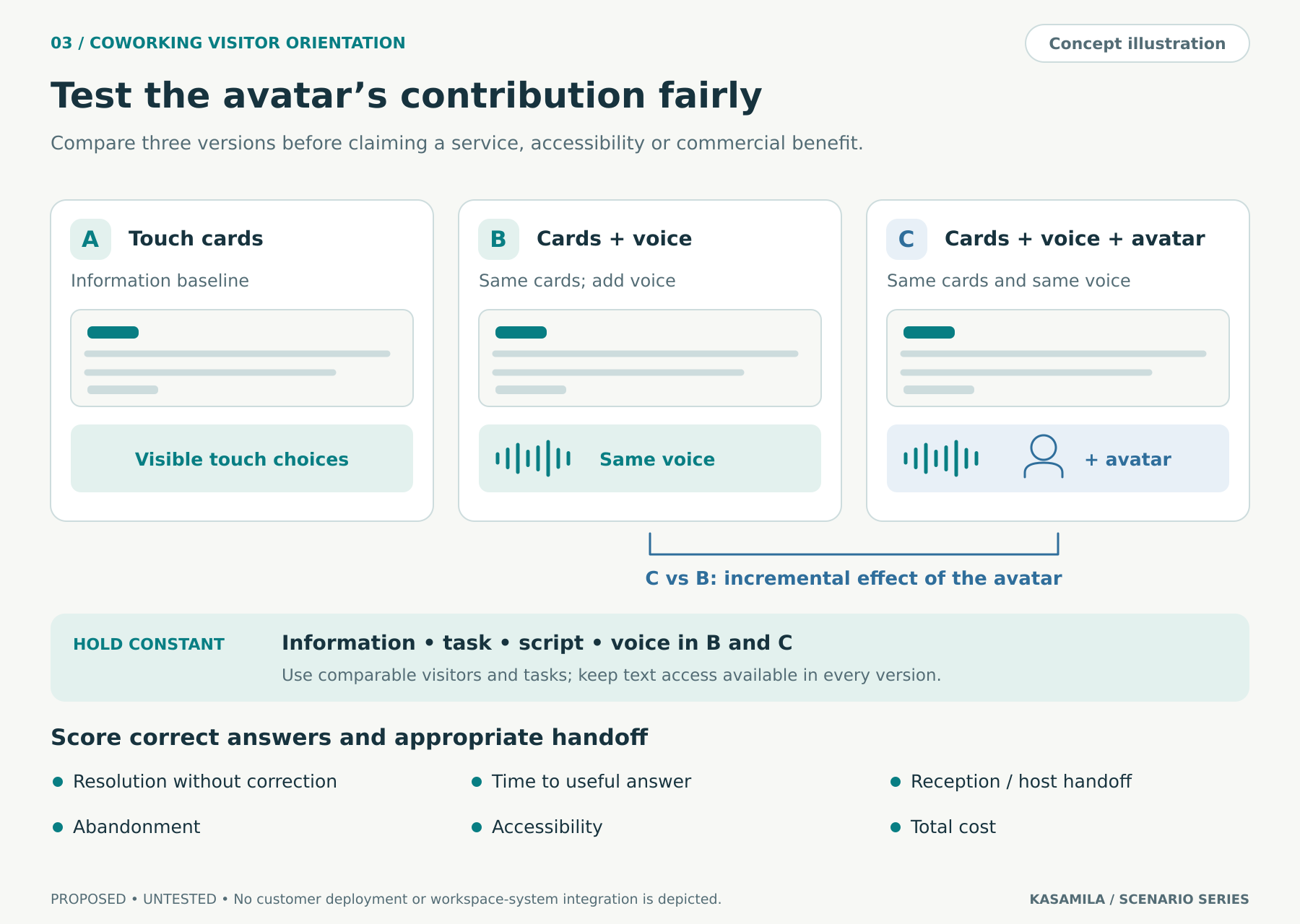
Figure 3. Proposed comparison plan. No uplift, savings or customer result is assumed.
Budget for the whole visit
Kasamila's standard API and SDK runtime is charged from session creation using elapsed server time, including listening, speaking, silence and a hidden canvas. A session left running while a visitor waits for a host can keep consuming runtime. The SDK's stop() stops audio; destroy() or the authorized session-end API ends the session. If an end request cannot reach the service, documented lease-expiry behavior matters. [1]
Keep the idle screen static. Start runtime when the visitor deliberately chooses the avatar, provide an explicit Finish control and add a visible inactivity warning. Test failure cleanup and a text fallback when concurrency or spending limits are reached. Reconcile lifecycle records with billed usage; an empty screen is not proof that the session has ended.
Budget separately for avatar runtime, speech recognition, the language model, text-to-speech, hosting, any template creation, implementation and reception support. Use the account's current rates and terms when approving the pilot. This proposal assumes no advertised price, free allowance or measured saving.
Start with one site and a few arrival questions
The first milestone is a dependable visitor journey: the right information, a clear route to reception and a clean session for the next person. Once that works, a fair comparison can show whether the avatar improves the experience enough to retain it.
Explore the Kasamila portal and developer resources to plan the pilot. Begin with a site-approved question set and an acceptance test for the actual installation.
Public sources checked on 20 October 2026. Recheck the selected software release and commercial terms before implementation.
Sources
[1] Kasamila Runtime integration guide. https://github.com/kasamila/kasamila-dev/blob/main/docs/api_v1_runtime_integration_guide.en.md
[2] Kasamila API and SDK developer handbook. https://github.com/kasamila/kasamila-dev/blob/main/docs/kasamila_api_and_sdk_guide.en.md
[3] Kasamila audio bridge examples. https://github.com/kasamila/kasamila-dev/blob/main/examples/audio-bridge/README.en.md
[4] MDN Web Docs on microphone access through getUserMedia. https://developer.mozilla.org/en-US/docs/Web/API/MediaDevices/getUserMedia
[5] W3C guidance for meeting WCAG. https://www.w3.org/WAI/WCAG22/quickref/
[6] NIST Engineering Statistics Handbook on randomized block designs. https://www.itl.nist.gov/div898/handbook/pri/section3/pri332.htm