A browser coach for learning a software task
A proposed Kasamila pilot for adult software onboarding
A proposed Kasamila pilot for adult software onboarding
Watching a tutorial and completing a task are different experiences. A new user may remember where a filter button sits, yet still save the wrong view when two conditions need to be combined. Replaying a five-minute video does not necessarily reveal which condition is missing.
For a software training team, a useful starting point is a small, resettable practice environment. Give the learner a real task inside that environment, observe the resulting application state, and offer one relevant hint. An optional Kasamila avatar could speak that hint while the learner keeps control of the work. The pilot should establish whether that visual presence helps beyond the same text and voice guidance, rather than assume that a face makes training effective.
This is a proposed design for adult learning, not a released Kasamila training product or a customer deployment. The example application and its data are fictional. It excludes production workspaces, employee scoring, certification and autonomous software operation.
Start with one task that can be checked
Imagine a training sandbox for a project-management application. The learner receives this instruction: “Create a saved view called Weekly handover showing Alex's unfinished tasks due this week.” The sandbox contains fictional people and tasks, including completed work, next week's deadlines and another person's assignments.
The task has an observable outcome. A saved view must have the right name, assignee, completion filter and date range. A friendly conversation about filters is not sufficient evidence of success. Nor is the learner saying “done.” The application must inspect the saved configuration and compare it with an instructor-approved rubric.
Keep the exercise narrow. Do not add invitations, exports, billing settings or automated messages. Freeze the sandbox's reference date so that “this week” has a stable meaning. If the underlying product uses different filter semantics, its training owner must revise the exercise rather than teach a convenient but inaccurate shortcut.
The audience matters too. This pilot is for adults learning a browser-based software workflow. A training provider would need separate decisions for children, regulated procedures, formal assessment or accessibility needs beyond the tested setup.
Follow the learner rather than narrate every click
The entry page states the goal and offers text, voice with text, or voice with text and an avatar. The task card remains visible. The learner can disable the visual layer without losing the exercise, and can start quietly without a microphone. Typed help requests are enough for the first pilot.
Suppose the learner selects Alex and this week's dates, but leaves completed tasks visible. On request, the coach might say: “Your view includes completed tasks. Check the completion filter before saving.” The interface highlights the relevant control through ordinary application code, not through an assumed ability of the avatar to see or point at the screen.
Use graduated help. The first hint names the missing condition. A second can explain where to find it. A worked example is available only when the learner chooses it, and that attempt is marked as assisted. This avoids turning the exercise into a sequence of instructions that the learner follows without understanding.
If the saved view is correct, explain why: “This view belongs to Alex, excludes completed work, and uses the current week's date range.” Then end the avatar session and present a new unaided task, such as creating a view for a different fictional teammate and a different date range. That transfer attempt is more informative than asking the learner to repeat the same clicks.
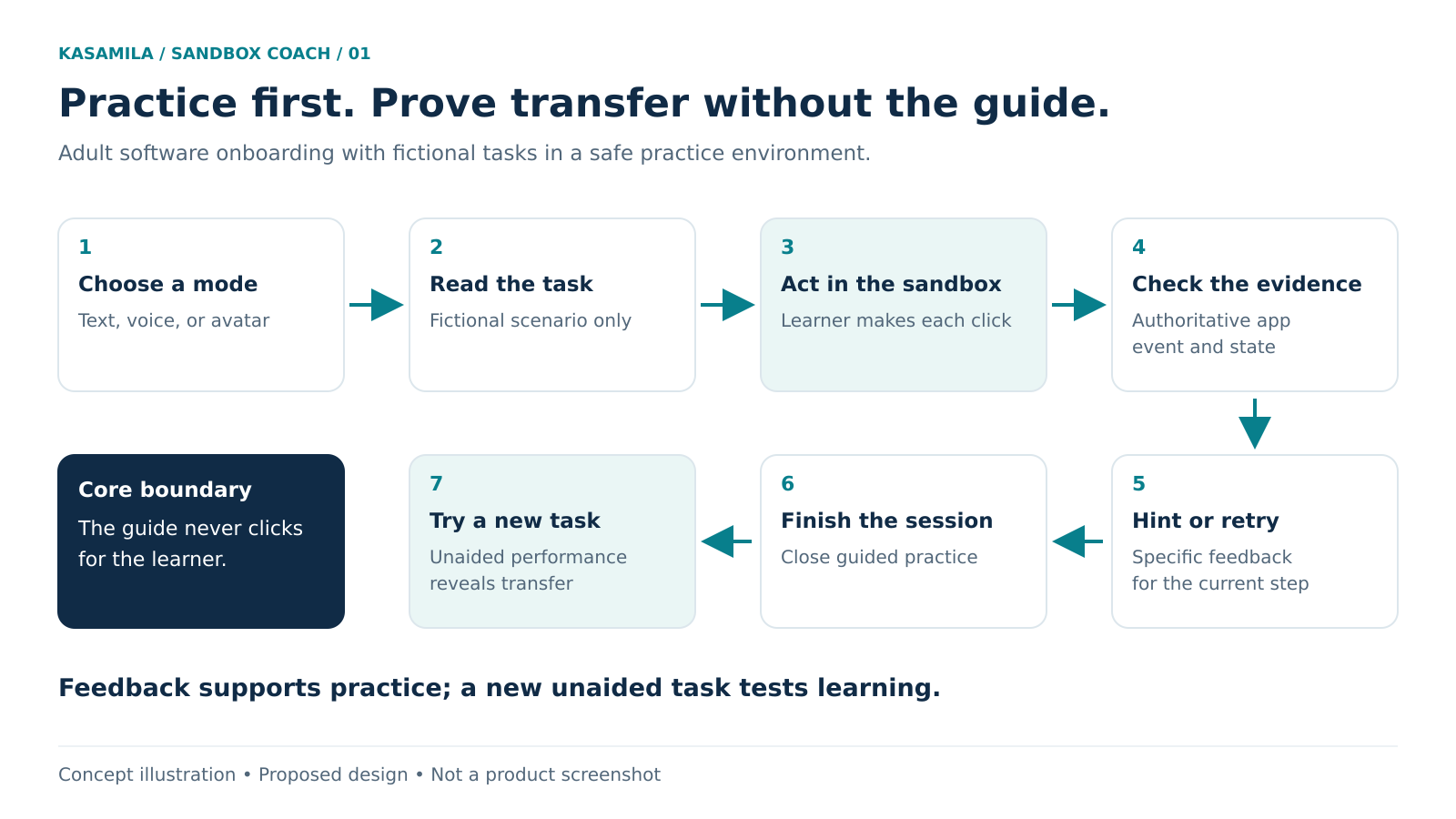
*Figure 1. Concept illustration of a proposed learning journey. The learner performs every action; the coach never operates the software on their behalf.*
Let application evidence decide what happened
The proposed training application owns the task model, sandbox, event collection, hint rules, reset behavior and completion check. Its backend should accept only the small set of events needed for the exercise, such as a saved view's validated filter values. A click event alone does not prove that a save succeeded. Check the resulting state and reject stale or duplicated events.
Prefer structured state over screenshots or unrestricted browser observation. A snapshot might contain an exercise identifier, state revision and the four relevant view settings. It should not contain real task descriptions, customer names, unrelated browser content or credentials. If no reliable state is available, the coach should say it cannot confirm completion and offer a manual check, rather than congratulate the learner from guesswork.
The public Kasamila guide describes a browser Runtime that accepts audio and renders the avatar. Permanent API credentials stay on the application backend; the browser receives a short-lived Runtime token. MCP is a server-side orchestration interface, not the browser renderer. These are building blocks, not a ready-made learning management system. [1]
For the proposed coach, deterministic rules can select the hint, and a text-to-speech service can produce its audio. An LLM is optional. If used to vary wording, it should not change the task criteria or invent application state. Deliver the same approved reply as visible text and audio, with one playback owner to avoid doubled speech. A new state revision should invalidate an obsolete hint before it is played.
Kasamila does not need permission to click, save views or administer the training application. Keep that separation explicit. The learner acts; the training system checks; the avatar presents a response. Public examples and mocked tests do not establish a completed production integration or a certified speech-provider connection. [2]
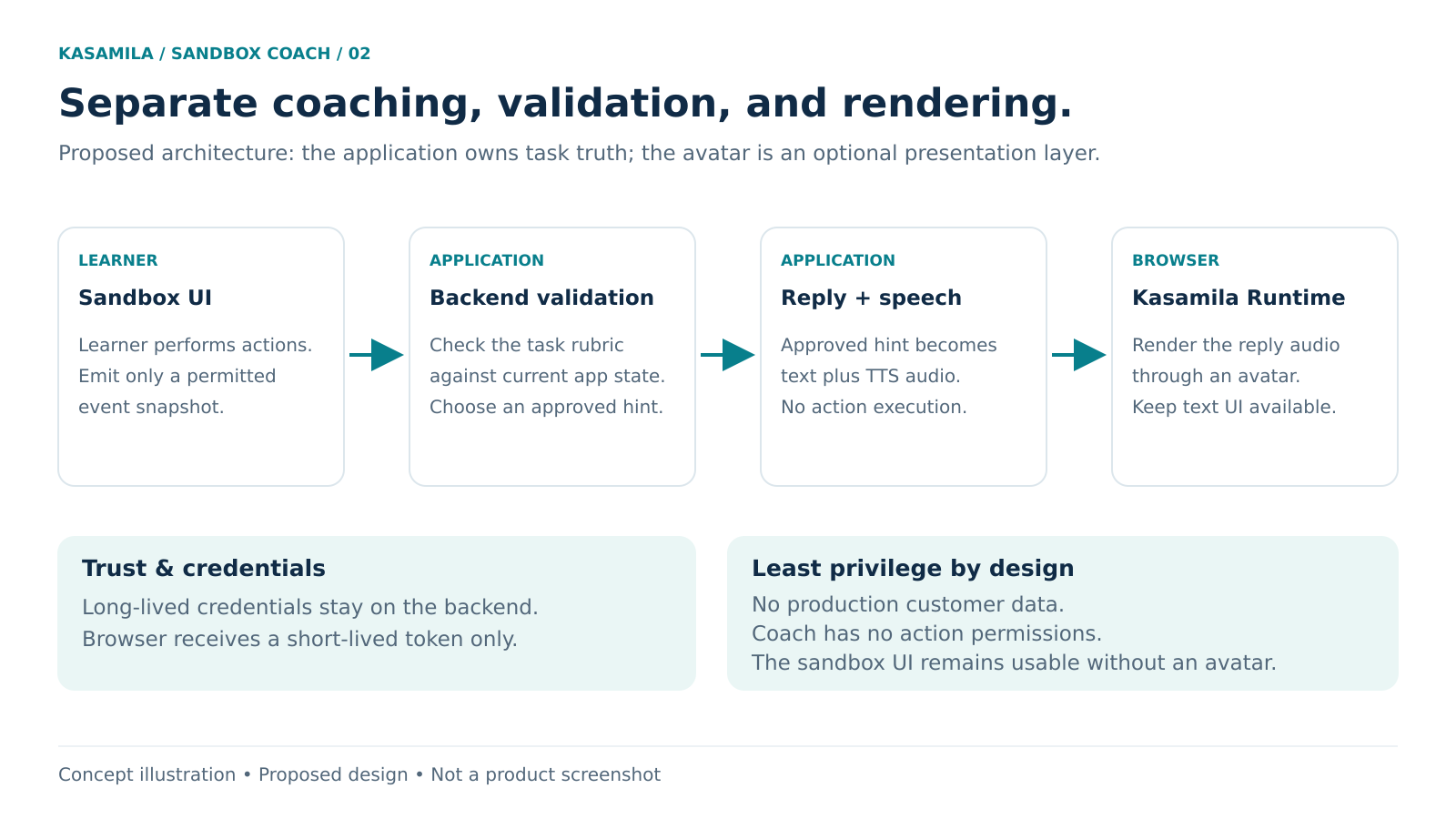
*Figure 2. Concept illustration of proposed responsibilities. Application connectors, task validation and speech services require implementation and testing.*
Build the smallest useful integration
Write the task contract. A training owner defines the starting dataset, reference date, accepted outcomes, common mistakes and hint ladder. Include a correct result reached through a different sequence of actions. The rubric should check the outcome, not insist on one memorized path.
Prove the text-only exercise. Implement reset, help, save verification and a clear Finish control. Try deliberately wrong date ranges, duplicate saves, back navigation and a disconnected session. Resolve task logic errors before adding speech or an avatar.
Add the presentation layers separately. Connect approved hints to TTS, then to the documented browser Runtime. Keep the task and hint timing identical across conditions. Use an authorized template and the documented media-delivery path. The application's token exchange needs authentication, scoped access and abuse controls; the public sample is not a substitute for those controls.
Test the actual learner setup. Verify the selected browser and version, graphics support, media loading, audio output, network conditions and behavior after switching tabs. Test keyboard navigation, text resizing and a screen reader in the complete training interface. W3C's guidance explains keyboard-operable functionality and user control over audio; an avatar does not by itself make the page accessible. [3][4]
Exercise failures before recruitment. If audio fails, keep the approved hint visible. If the avatar fails, preserve the sandbox. If a save cannot be verified, avoid a success message. If the learner resets the task, cancel the old response and its queued audio. Distinguish an audio interruption from ending the Runtime session.
Review with an instructor. Run the exercise with a small supervised group before broader testing. Check whether hints teach the intended concept, whether event records match what participants did, and whether participants understand that the coach is automated. Set a retention period and collect only the events necessary to answer the pilot questions. Do not repurpose practice records for employment evaluation.
Measure independent performance
The hypothesis is specific: seeing a speaking coach might make short hints easier to follow or help a learner return to the task after an error. It could also distract from the interface, cover useful controls or slow the exercise. Engagement time alone cannot settle the question.
Compare three versions of the same sandbox: A uses text hints; B adds voice to those hints; C adds the avatar to B. The comparison of C with B isolates the visual layer more closely than comparing C with an unsupported task. Keep the voice, wording, response timing, hint policy and task difficulty comparable.
Use a new, unaided task as the primary outcome. Record the proportion of assigned participants who produce a correct saved view, with failed starts and withdrawals visible rather than silently excluded. Report assisted-task completion separately. A participant who succeeds only after a worked example has had a different learning experience from one who transfers the skill unaided.
Secondary measures can include time to a correct result, hint requests, recovery after an incorrect filter, incorrect feedback, startup failures, accessibility problems and participant preference. A short follow-up task on another day can explore retention; an immediate retry cannot establish it. Use equivalent task variants and random assignment where feasible, or counterbalance order and explain the limitations. Avoid claiming proven learning gains from a small feasibility group.
Before collecting results, agree which errors require a pause, what improvement would justify the added cost, and how uncertainty will be reported. A wrong success message or a hint that teaches the wrong filter rule deserves investigation even if participants like the avatar.
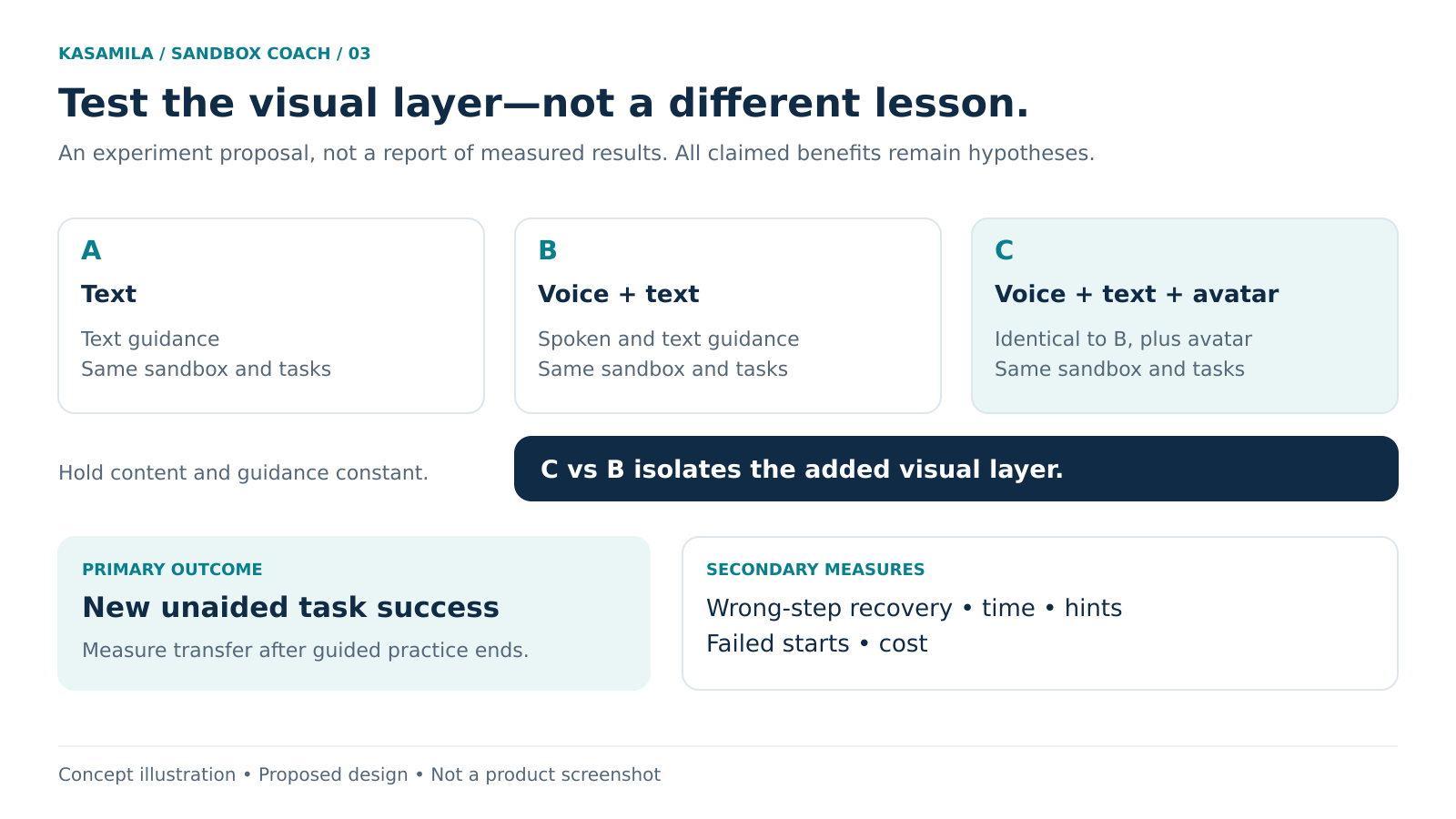
*Figure 3. Concept illustration of a proposed evaluation. It contains no measured results or claimed uplift.*
Budget for the time spent thinking and clicking
Kasamila API Runtime usage includes listening and silence, not just speech; hiding or muting the avatar does not end the session. LLM, speech recognition and TTS are separate services and costs. [5] In this scenario, the learner may spend most of the session working quietly in the sandbox, so spoken-audio length is a poor budget estimate.
Keep instructions, device checks and the unaided assessment outside active avatar runtime where practical. Create a session only when the learner deliberately starts that mode. Give the learner an explicit Finish control and a visible inactivity warning with a text-only continuation path. The documented destroy() or authorized session-end operation ends Runtime; stop() only stops audio. Verify termination, including initialization failures and page navigation, rather than assume a quiet screen means billing has stopped. [1]
Estimate the pilot from total active-session seconds across all participants and retries, divided by 3,600, multiplied by the applicable hourly rate. Add speech and model charges, hosting, template preparation, implementation, accessibility testing and instructor review. Compare C's incremental cost against B alongside the independent-task outcome. Use the current account and checkout terms before approving spend; this proposal commits to no purchase and assumes no free allowance.
Keep the coach only if it earns its place
The practical deliverable is a reliable exercise with an optional presentation layer. If the avatar improves independent task performance or a defined learner experience enough to justify its cost and operational burden, test another bounded task. If it does not, the text and voice versions should remain useful.
A sensible first discussion with a training team starts with one question: which software task do new users repeatedly misunderstand, and what application state would prove they can now complete it without help?
Explore Kasamila's public entry point: https://www.kasamila.com/portal?lang=en
Sources
Public sources checked 26 October 2026. No production training session, learner study or provider end-to-end integration was run for this article.
- Kasamila Runtime API, Web SDK and MCP integration guide. Browser architecture, authorization and lifecycle. https://github.com/kasamila/kasamila-dev/blob/main/docs/api_v1_runtime_integration_guide.en.md
- Kasamila developer resources. Example scope and local-test limitations. https://github.com/kasamila/kasamila-dev
- W3C WAI, Understanding Success Criterion 2.1.1 Keyboard. https://www.w3.org/WAI/WCAG22/Understanding/keyboard.html
- W3C WAI, Understanding Success Criterion 1.4.2 Audio Control. https://www.w3.org/WAI/WCAG22/Understanding/audio-control.html
- Kasamila pricing and metering scope. https://www.kasamila.com/pricing