A browser avatar that explains service outages without guessing
A proposed Kasamila pilot for SaaS customer support
A customer has a report due, but the export button has stopped working. The status page says that engineers are investigating. The customer still has practical questions: does this affect my region, should I retry, and where will the next update appear?
An optional speaking avatar could make that explanation easier to follow. It could also make a vague answer feel more authoritative than it deserves. The useful design question is therefore quite narrow: can a short, clearly sourced explanation help a customer choose the right next step, without adding speculation, delay or friction?
This article proposes a browser-based Kasamila pilot for that question. It is a design proposal, not a report of a deployed customer system. Kasamila would present approved audio through a digital avatar. The service operator would continue to own incident facts, recovery decisions and customer support. The status page and a readable text answer must remain available even when the avatar cannot load.
Why this customer journey needs a different kind of assistant
During an outage, a fluent explanation is useful only if it preserves uncertainty. A message about delayed exports cannot justify saying that saved files are safe, that every account is affected, or that service will return in ten minutes. Each of those is a separate claim requiring approved evidence.
Atlassian’s incident communication guidance treats communication as an ongoing process across channels, with clear information about the disruption and subsequent updates. That is a useful foundation for this proposed experience: the avatar is another presentation of the operator’s approved update, rather than a new source of incident truth. [1]
The pilot should start with one non-critical SaaS feature, such as report exports. Exclude security incidents, payment disputes and any situation requiring individualized legal or safety advice. Do not introduce a new interface during a live emergency before testing it in a rehearsal. The first audience can be consenting adults evaluating fictional incident scenarios.
Follow one customer from confusion to a usable next step
The customer opens the help page from the failed export screen. A compact status card appears first: the affected component, the operator’s latest update, its publication time and a link to the canonical incident page. Below it are equally visible choices to read the explanation, hear it, or hear it with an avatar. Nothing speaks automatically.
The customer selects the affected feature and region from a small list. These are routing inputs, not proof that their individual account has been diagnosed. The explanation might say: “The current notice covers exports in the region you selected. The operator is investigating. No recovery estimate has been published. Open the incident page for updates, or contact support if your problem is different.” This is a fictional example, not a statement about a current outage.
If the notice includes an approved workaround, the page can show its exact steps and limitations. If it does not, the assistant should not invent advice such as repeatedly resubmitting jobs or clearing application data. The customer can choose the operator’s existing update subscription or support route. Subscribing remains an explicit customer action, not an automatic side effect of speaking to the avatar.
The session ends when the customer closes the experience or chooses a next step. They should never have to keep an avatar running to keep access to the incident text. Figure 1 shows this proposed journey, including the direct path that skips the avatar.
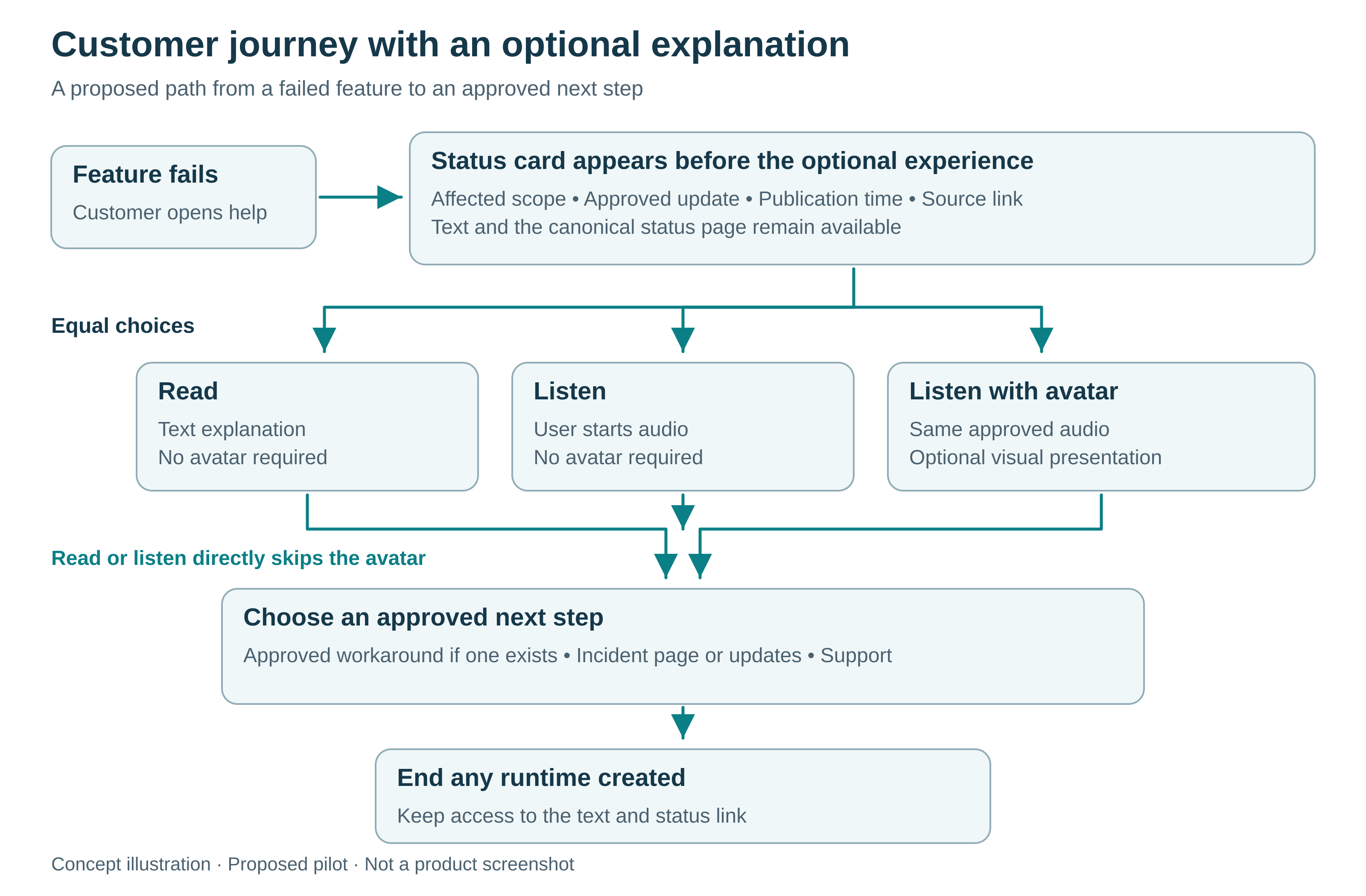
*Figure 1 — Customer journey with an optional explanation — Concept illustration; proposed pilot, not a product screenshot or real deployment.*
Give every answer a source and an expiry rule
A practical incident record contains an incident ID, component and region scope, current state, approved explanation, optional workaround, publication time, source URL and revision. The operator also defines a freshness rule. These are proposed application fields, not built-in Kasamila incident-management features.
Keep the source publication time separate from the time your application fetched it. A successful fetch of a three-hour-old notice does not make the incident information new. Likewise, a scheduled next update is not a recovery estimate. The interface should display these distinctions in ordinary language.
For the first pilot, prefer approved response templates over unrestricted generation. Match a few supported questions to the relevant fields: “What is affected?”, “Is there an approved workaround?” and “Where can I get updates?” Free-form questions can fall back to text or support when they cannot be answered from those fields. If a language model is added later, require it to use the same approved facts and test its refusals; retrieval alone does not guarantee accuracy.
When the source is stale, missing or inconsistent, stop giving a current-status explanation. Say that the page cannot confirm the latest state and offer the canonical status link. An older notice may remain visible as historical information if clearly labeled. Never silently convert an earlier “investigating” message into “resolved.”
When a revision changes during playback, invalidate queued audio based on the old revision. The proposed application should interrupt obsolete speech and present the new text before offering a fresh explanation. A short-lived source record and a short-lived browser token solve different problems: one protects factual freshness, the other limits runtime access. Neither substitutes for the other.
Where Kasamila fits
The current official Runtime guide describes browser-side Audio2Viseme inference and WebGL rendering. The application backend holds the permanent API key and supplies a short-lived Runtime token to an authorized browser. Documented audio inputs include files, PCM/TTS streams and RTC tracks. [2]
For this pilot, begin with one approved text-to-speech audio response or an authorized recorded voice. The audio provider produces the speech; Kasamila renders the avatar using that audio. The website still owns the status card, transcript, accessible controls and routing logic. An animated expression is not evidence that the underlying answer has been checked.
The operator owns incident publication and correction. The application team owns source validation, revisions, language review and safe fallbacks. Support owns individual account questions and compensation decisions. Kasamila provides the visual runtime. Speech recognition, text generation and speech synthesis are separate services when used.
MCP can be used for server-side session orchestration, but it does not replace the browser Runtime SDK or generate incident answers. A web integration does not establish a native mobile SDK, telephone/PSTN integration or certified Statuspage connector. Repository examples and contract tests do not establish credentialed provider end-to-end validation. No particular customer environment has been tested for this article. [2][3]
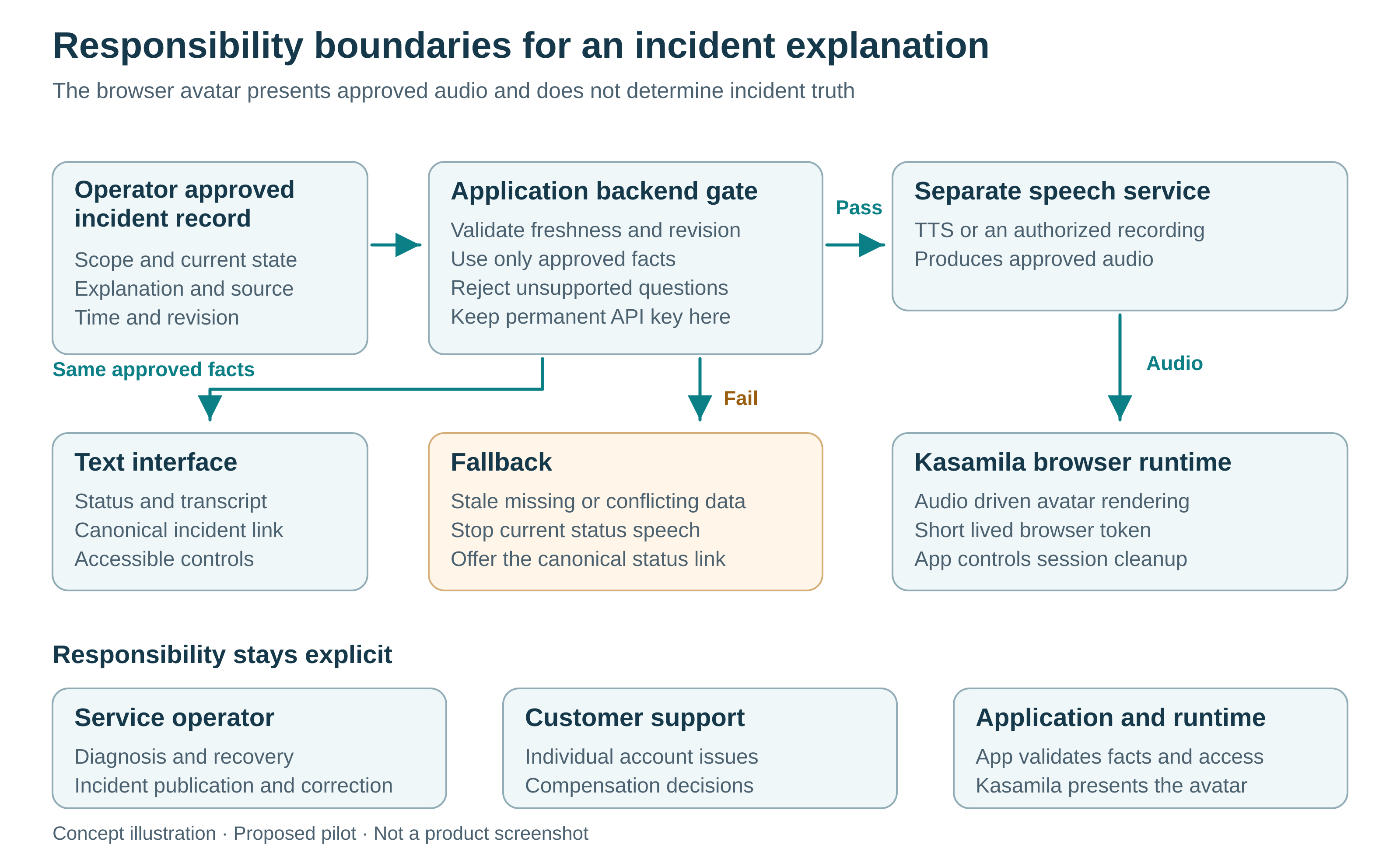
*Figure 2 — Responsibility boundaries and the approved information path — Concept illustration; proposed pilot, not a product screenshot or real deployment.*
Build the smallest useful version
First, prepare a fictional incident set with an operator-approved answer key. Include an active incident, an unknown recovery time, an approved workaround, a corrected update and an unavailable source. Make sure the same text is usable without voice or animation.
Second, implement a read-only source adapter in the application backend. Verify any real provider’s access method, permissions, rate limits and failure behavior before connecting it. Treat imported descriptions as data, never as instructions that can change the assistant’s permissions. Do not feed internal incident chat, credentials or unredacted logs into the public experience.
Third, establish the browser path using the current official SDK guidance. Protect token issuance, restrict the permitted origin and template, and use a supported audio format with the correct sample rate. Select a documented release and check its current release requirements before testing. A successful local mock proves only the behavior exercised by that mock.
Fourth, test on the actual browser and device intended for the pilot. Include audio permission refusal, slow loading, network loss, page navigation, backgrounding and source changes during playback. Do not infer compatibility from a device name or a successful desktop demonstration. If avatar initialization fails, terminate any created session and keep the text path usable.
Fifth, rehearse the operational escape routes. An operator must be able to disable the optional avatar without removing the status page. A support link must remain visible. The avatar must not diagnose a customer’s account, retry exports, change settings or promise credits. Those actions require different systems, permissions and review.
Design for a customer who wants to skip it
A distressed customer may prefer a two-sentence answer to a speaking face. Keep the status and next step above the optional experience, and preserve keyboard navigation. Offer text alongside speech, an obvious audio stop control and a separate End experience control. Explain that stopping speech does not necessarily end the underlying session.
W3C guidance on audio control warns that automatically playing sound can interfere with screen readers and recommends user-initiated playback. Its status-message guidance explains how important changes can be exposed to assistive technologies without moving focus. Apply those ideas to the surrounding page, then test with people and assistive technology. Adding an avatar or captions does not by itself establish accessibility conformance. [4][5]
Use a restrained visual style and identify the experience as automated. Do not make the character appear to be the engineer currently repairing the service. Avoid celebratory animation when the incident status is uncertain. The proposed pilot can use a neutral template rather than commissioning a custom persona before its value is known.
Measure understanding rather than attention
Compare three versions with the same approved facts and next-step choices: text only, text plus audio, and text plus the same audio and Kasamila avatar. Randomize comparable participants and scenarios during rehearsal. Keep the voice, script and information timing identical between the two audio versions, so the test can isolate the visual contribution.
The primary measure is correct next-step selection against the approved scenario answer key. Also ask what the participant believes is known, unknown and expected next. Someone who confidently invents a recovery time after listening has misunderstood the message, even if they liked the avatar.
Record time to find the incident link, unsupported statements, stale-answer exposure, fallback success, accessibility problems, abandonment and runtime cost per correctly completed task. Record preference separately. Longer viewing time can mean confusion; fewer support requests can mean users gave up. Neither proves improved service by itself.
Before recruiting participants, agree on the minimum improvement that would justify the extra cost and the safety failures that would stop a rollout. Do not choose success thresholds after seeing the results. A small rehearsal can expose design faults but cannot establish population-wide benefits. If the avatar version adds no useful improvement over audio, retain the simpler experience. Figure 3 shows the proposed comparison and decision gates.
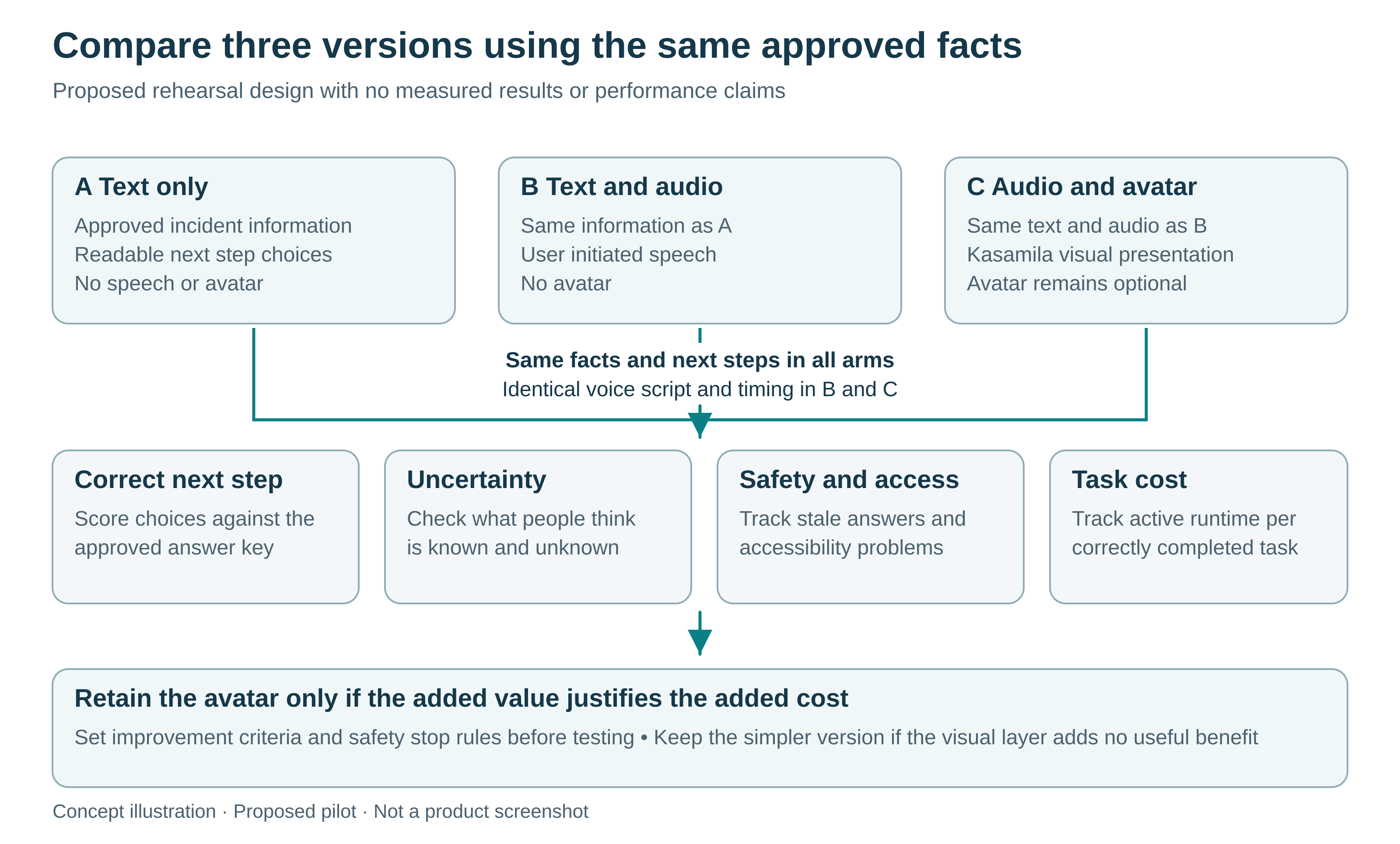
*Figure 3 — Three comparable pilot versions and decision gates — Concept illustration; proposed pilot, not a product screenshot or real deployment.*
Keep a short explanation from becoming an idle bill
As checked on October 30, 2026, the public pricing page lists a one-hour registration grant valid for 30 days and a standard 10-hour runtime pack at US$10, valid for one year. Account eligibility, available checkout items and applicable taxes still need checking. This article is not a purchase instruction. [6]
Budget using total active session time, including initialization and waiting, rather than only spoken seconds. API/SDK runtime continues to consume time while running, listening or muted. LLM, STT and TTS costs are separate. Stop audio when appropriate, but explicitly end the runtime and verify termination. A hidden panel is not an ended session. [2][6]
Use an application-side maximum duration and an idle timeout, with server-side cleanup for failed initialization and interrupted connections. Validate the cleanup path during testing rather than assuming a page-close event always arrives. Track actual runtime usage separately from customer task completion.
For an illustrative rehearsal of 60 sessions averaging two active minutes each, total runtime would be two hours. At a US$1-per-hour standard-pack unit rate, that is US$2 of runtime consumption, not necessarily the cash required to buy a pack. Add voice services, application hosting, implementation, content review and support time. These are planning assumptions, not a forecast or a promised result.
A useful outcome is a clearer decision
The strongest first deployment may be a modest optional explanation beside an already reliable status page. Start with a read-only, non-critical scenario, preserve the customer’s ability to skip the avatar and refuse to fill gaps in incident knowledge.
Kasamila can supply the browser-based visual layer. The proposed pilot must establish whether that layer actually helps people understand the same approved information. If it does, the team has evidence for a broader evaluation. If it does not, a clearer text page is still a worthwhile result.
Sources
[1] Atlassian, Incident Communication Best Practices and Channels. [2] Kasamila, Runtime API Web SDK and MCP integration guide. [3] Kasamila developer repository and validation limits. [4] W3C WAI, Understanding WCAG 2.2 Audio Control. [5] W3C WAI, Understanding WCAG 2.2 Status Messages. [6] Kasamila public pricing. Sources checked October 30, 2026. Public documentation was reviewed; no runtime, incident-provider integration or customer deployment was tested for this article.