A browser avatar guide for consumer electronics setup
A proposed Kasamila after-sales pilot using version-matched setup instructions, owner-controlled steps, a consented support handoff and a fair test of the avatar's added value.
Helping a webcam owner follow the right instructions and reach support with useful context
A customer has connected a new USB webcam, but their video app still shows the laptop camera. The support page lists several products and operating systems. Before the customer can follow a setup step, they have to work out which instructions apply.
This is a useful first scope for an interactive after-sales guide. Help the owner identify the product and software, explain one approved step at a time, and provide a clear route to support when the instructions do not resolve the problem. Kasamila can supply the talking avatar in a browser experience built around that task.
The design below is a proposed implementation for a consumer-electronics brand or support platform. It is not a customer deployment, a device-compatibility claim or a report of measured improvement. The pilot should establish whether a conversational guide helps, then measure the avatar's additional contribution.
Start with a problem the support team can verify
Choose one supported webcam model, one operating-system version and one video application for the initial test. A suitable task might be selecting that webcam in the application's camera menu and confirming that its preview appears. The manufacturer must approve the exact instructions and supported configuration before the guide presents them.
Interview support staff and examine appropriately de-identified cases to test the likely pain points. Owners may follow a manual for a similar model, miss a setting hidden in the video app, or struggle to describe what they have already tried. A long answer can add to the problem when the user needs to switch windows and perform a single step. These are hypotheses to check against the brand's support evidence, not universal findings about webcam owners.
Keep the first workflow read-only from the guide's perspective. The owner operates their own video application. Firmware updates, driver installation, account recovery, changes to security settings, hardware repair and warranty decisions should leave this bounded flow for an approved support process.
Give the owner control of each step
The landing page identifies the guide as AI and offers text or voice. It asks for the exact model using a readable model label or a product selection list, followed by the operating system and video-app version. Serial numbers, purchase receipts and account details are unnecessary for this initial setup question.
The application retrieves a manufacturer-approved instruction card that matches that combination. The card shows its source, applicable version and review date. If no approved match exists, the guide explains the gap and offers support instead of borrowing steps from a nearby model.
The owner asks, "Why am I still seeing the laptop camera?" The guide explains the relevant camera-selection step while the card keeps the menu name and expected outcome visible. It pauses for the owner to try it. A repeat button, text response and stop control remain available; the avatar should not cover the instruction or force a user to keep listening.
The owner checks the preview in their own video app. This proposed guide does not require access to the camera stream, the screen or the computer's settings. A reply such as "I can see it now" is a self-reported result. The interface must not describe it as an independently verified diagnosis or successful repair.
If the result differs from the instructions, the guide asks one useful clarifying question or offers a handoff. It shows a short summary of the model, software version, approved steps attempted and unresolved symptom. The owner can edit that summary and explicitly choose whether to send it through the brand's existing support channel. Only an actual acknowledgment should produce a "request received" message.
After completion or exit, the application clears the visible conversation and ends the runtime. Clearing the screen alone does not establish deletion from backend logs; the retention policy must describe what actually happens.
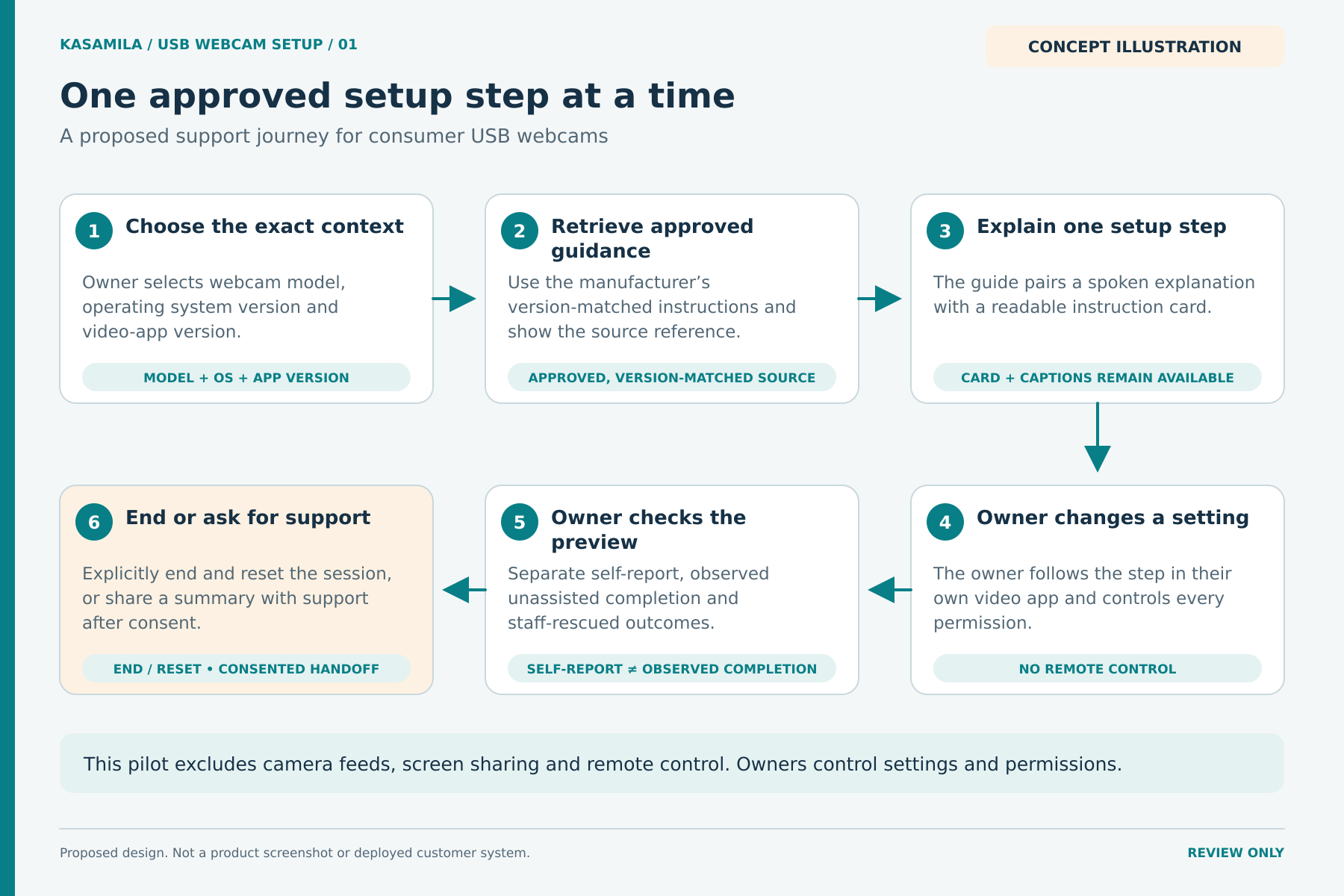
Figure 1. Proposed setup journey. The owner controls their device. Concept illustration, not a product screenshot or a deployed customer system.
Put each part of the system in the right place
Kasamila's public developer documentation describes browser-side, audio-driven avatar inference and rendering. The documented integration keeps the permanent API key on a backend and gives the browser a short-lived runtime token. Public examples show ways to feed reply audio into the SDK, including PCM and RTC audio paths. The chosen provider, audio format and playback behavior still need integration testing. [1][2]
The brand's application would own the product and software selectors, approved-document retrieval, conversation logic, instruction cards, optional speech recognition, language model and text-to-speech services. Kasamila would render the avatar from the reply audio. Generate the spoken response and visible instructions from the same approved answer, and use one playback owner to avoid hearing the reply twice.
If the team uses Kasamila's MCP server, treat it as a server-side integration and orchestration surface for the operations documented there. Browser avatar rendering remains a separate SDK responsibility. An MCP server does not automatically connect every agent, support system or device. [3]
Public API and SDK examples are development references. They do not establish a native mobile SDK, remote desktop control, webcam-driver support, phone-network integration or end-to-end certification of this proposed support experience. Compatibility with the selected browser, operating system, graphics hardware and audio devices must be tested on the actual setup.
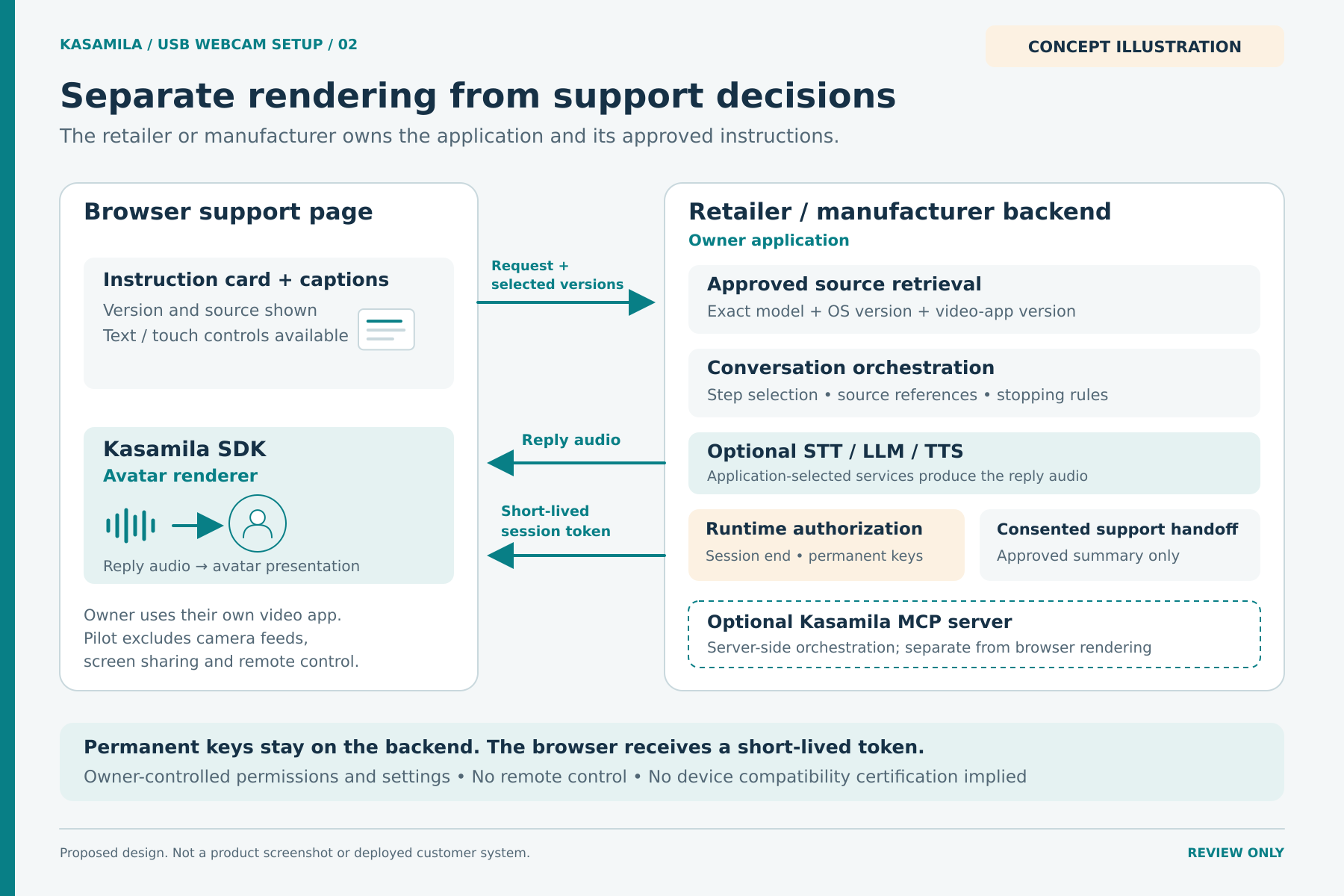
Figure 2. Proposed system responsibilities. The browser renderer, application services and optional server-side MCP integration have separate roles. Connections require implementation and testing.
Build a small integration that fails clearly
Begin with an approved content set. Each instruction needs a model identifier, applicable software versions, source link, review owner and expiry or review rule. Store the expected outcome and a safe stopping point with the step. If a source is missing, expired or contradictory, suppress the instruction and route to support. Treat retrieved content as data, never as permission to execute commands.
Next, build the browser page and backend authorization route. Authenticate and rate-limit requests as appropriate, keep permanent credentials on the server, and restrict runtime access to the intended template, origin and input modes. Follow the selected session's SDK descriptor and the current media requirements. The documented geometry path requires caller-hosted HLS media and a matching descriptor; plan its hosting and access controls. Use a supported SDK release rather than copying a version from an old tutorial. [1][8]
Then connect the conversation and audio path. The support application must handle corrections, cancel an obsolete answer and prevent late audio chunks from restarting it. Test names and model numbers that speech recognition confuses. Keep the text path usable when the owner declines the microphone or the audio service fails.
Finally, connect the approved escalation process and test the complete lifecycle. Include unsupported configurations, stale instructions, ambiguous descriptions, a missing support acknowledgment, blocked audio, a lost connection and an abandoned page. Record the environment and outcome for each case. A successful demonstration on one laptop is not a compatibility statement for every customer's computer.
Make privacy and accessibility part of the task
Ask only for information that helps complete this setup. Keep the first pilot free of camera uploads and screen sharing. For a voice option, explain which services receive microphone audio or text, why they receive it and how long it is kept. Browser-side avatar processing does not make separately hosted speech or language-model processing local.
Browser microphone capture requires a secure context and user permission. A permission denial should leave the owner with working text instructions, not an instruction to weaken browser or operating-system security. Browser policies and available media devices are part of the test environment. [5]
Provide readable instruction cards, keyboard navigation, a clear focus order, text equivalents for spoken steps and controls to pause or stop. Let users complete the task without the avatar or voice. WCAG is a useful framework for assessing the web experience; listing these features does not establish conformance. Test the actual interface with representative users. [6]
Test the avatar against the same support task
Run three comparable conditions: instruction cards with text or touch; the same content and task scope with conversational voice; and that same voice experience with the avatar. Use the same approved source version, task difficulty, placement, support availability and eligible device configurations. The last two conditions should share dialogue logic, voice, captions and instructions so that adding the avatar is the material difference.
Randomly assign conditions within comparable device and experience groups before sessions start, and include failed starts and abandoned sessions in the assigned-session totals. Log configuration and source-version changes rather than silently mixing them. This use of consistent conditions and balanced groups follows standard experimental-design principles. [7] Set the test size and decision criteria before examining results; a small feasibility pilot can reveal failures without proving a reliable improvement.
Use a concrete task outcome. In a consented supervised test, an observer can check that the intended webcam appears in the video app's preview. Record this separately from the owner's self-report. A successful handoff can be an appropriate outcome for an unsupported case; it should not be counted as a completed setup.
Track unassisted observed completion separately from completion after staff rescue. Also measure unsupported or incorrect instructions, abandonment, accessible task completion, acknowledgment of approved handoffs and total cost per completed setup. Include staff time spent supervising, correcting and rescuing sessions. Time on page and conversation length are diagnostic measures: an extended exchange may reflect confusion.
Compare voice plus cards against cards to assess that conversational package. Compare avatar plus voice against the same voice experience to estimate the avatar's incremental value. Report the number of assigned sessions and uncertainty alongside any difference. The avatar may make the guide easier to follow, or it may distract from the setting the owner needs to find. The test should be able to reveal either result.
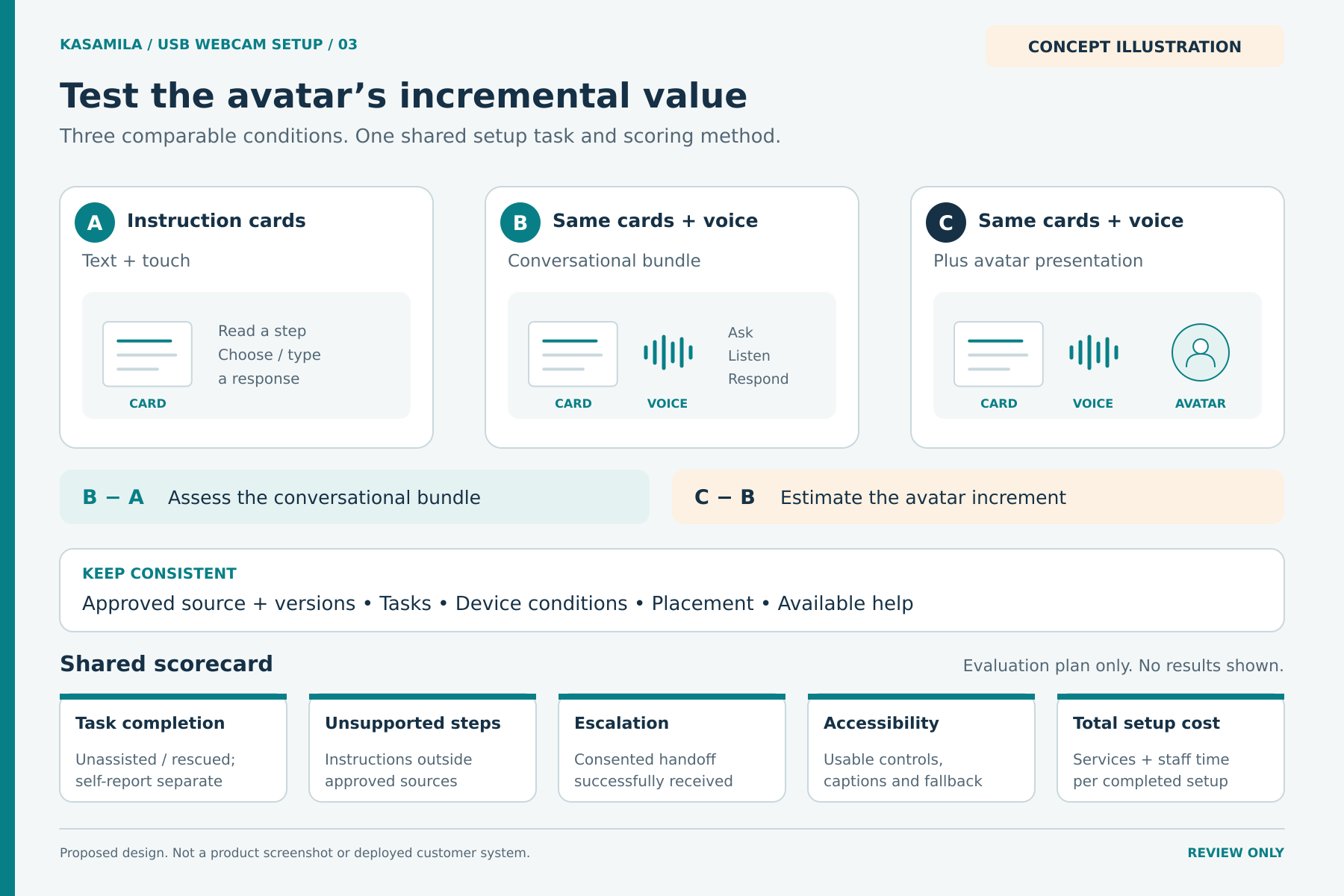
Figure 3. A proposed comparison plan. No outcomes or performance improvements are assumed.
Budget for the whole support session
Kasamila's standard API and SDK runtime is billed from session creation using elapsed server time, including listening, speaking, silence and hidden canvases. An owner who switches windows to follow a step may still have an active session. Stopping audio with stop() does not end billing. Use destroy() or the authorized session-end API, confirm termination and account for documented lease-expiry behavior if the end request cannot reach the service. [1]
Keep a static help page available without starting an avatar session. Start runtime when the owner chooses the experience, make its active state clear, and provide an explicit end button. Use a disclosed inactivity warning and tested cleanup after failures. Rate limits, concurrency limits and spend alerts should have a usable text fallback.
As checked on 19 October 2026, the pricing page lists standard 10, 50 and 100-hour runtime packs at US$1 per hour, valid for one year, without automatic renewal for newly purchased packs. Taxes may apply. New accounts receive one free API/SDK runtime hour shared across the account, valid for 30 days. Private-template creation uses separate credits. Confirm the account's current eligibility, quotas and checkout terms before budgeting. [4]
Add separate speech-recognition, LLM, text-to-speech, hosting, template creation, integration and support costs. For planning, 120 sessions averaging three runtime minutes would use six runtime hours before additional retries or abandoned sessions. At the listed rate, that is US$6 of runtime consumption before tax. The smallest listed standard pack costs US$10 before any tax, so usage value and upfront cash outlay differ. It is an illustrative workload, not a forecast. Reconcile billed usage against backend lifecycle records and calculate total pilot spend per observed completed setup. Report appropriate support handoffs separately.
Start with one supported configuration
Choose one product, one setup question and a small approved content set. Establish that owners receive the right instructions and can reach support when those instructions stop applying. Then test whether the avatar adds enough value over the same voice-and-card experience to justify its cost and complexity.
Explore the Kasamila portal and developer resources when designing that pilot. The useful deliverable is a repeatable support journey with honest status, verified boundaries and a measurable outcome.
Public sources checked on 19 October 2026. Recheck commercial terms and the selected software versions before implementation.
Sources
[1] Kasamila Runtime integration guide. https://github.com/kasamila/kasamila-dev/blob/main/docs/api_v1_runtime_integration_guide.en.md
[2] Kasamila audio bridge examples. https://github.com/kasamila/kasamila-dev/blob/main/examples/audio-bridge/README.en.md
[3] Kasamila Runtime guide including server side MCP responsibilities. https://github.com/kasamila/kasamila-dev/blob/main/docs/api_v1_runtime_integration_guide.en.md
[4] Kasamila pricing. https://www.kasamila.com/pricing?lang=en
[5] MDN Web Docs on getUserMedia. https://developer.mozilla.org/en-US/docs/Web/API/MediaDevices/getUserMedia
[6] W3C Web Accessibility Initiative WCAG overview. https://www.w3.org/WAI/standards-guidelines/wcag/
[7] NIST Engineering Statistics Handbook on randomized block designs. https://www.itl.nist.gov/div898/handbook/pri/section3/pri332.htm
[8] Kasamila API and SDK developer handbook. https://github.com/kasamila/kasamila-dev/blob/main/docs/kasamila_api_and_sdk_guide.en.md