
A character at the table: designing a useful AI host for themed restaurants
A practical Kasamila concept for short story moments, clearer menu explanations and a service-friendly pilot
A guest opens the menu at a fictional harbor-themed restaurant. The atmosphere is easy to understand: lanterns, sea charts and a harbor keeper with a story to tell. The dish names take more work. What exactly is the “Captain’s Lantern,” and how does it fit into this world?
A short character interaction could answer both questions. The harbor keeper gives a brief introduction, then displays the restaurant’s approved, plain-language description of the dish. The guest can read quietly, listen, ask a supported question or return to their server.
This is a proposed implementation, not a customer deployment. The aim is to make one part of a themed meal easier and more enjoyable without competing with the people, food and conversation around the table.
Start with the moments that need help
Before building the character, watch how the restaurant tells its story today. Ask the team where guests need clarification and when an extra interaction would interrupt service.
Possible friction points include imaginative dish names that hide practical information, a story that depends on one busy staff member, and lengthy explanations arriving just as guests want to order. Noise, shared tables and different comfort levels with speaking to a screen also matter. These are hypotheses for the target venue to check, not claims about every themed restaurant.
Choose one useful starting task: a short introduction to the setting and explanations of a small, approved selection of dishes. Keep the first pilot focused on adults and avoid accounts, guest profiles, face analysis or personal-data collection. Use an original character or obtain the necessary rights for the character, voice and likeness before making its media.
Give the guest control of the moment
The restaurant’s own web experience could offer three clear choices: “Meet the harbor keeper,” “Read the menu” and “Ask your server.” A QR code is one possible entry point; a venue-selected screen is another. Both require testing on the actual browser and device. Neither implies an existing Kasamila hardware integration.
Introduce the character as AI. Start audio only after the guest chooses it, explain microphone use before requesting permission, and keep captions and touch controls available. A guest who declines the microphone should still be able to use the experience.
Let the first story beat be brief. Then offer a few specific questions rather than an open-ended conversation with no natural finish. For example: “What is the Captain’s Lantern?” The answer should pair the themed name with an approved description on screen. In this fictional example, that might be a roasted mushroom grain bowl; the real restaurant must supply its own accurate wording.
The character should yield when food or a server arrives. Keep a visible End control and a quiet route back to the menu. For the initial pilot, “Ask your server” can simply explain how to get human help. It must not say that somebody has been notified unless a real staff-response workflow exists and has been tested.
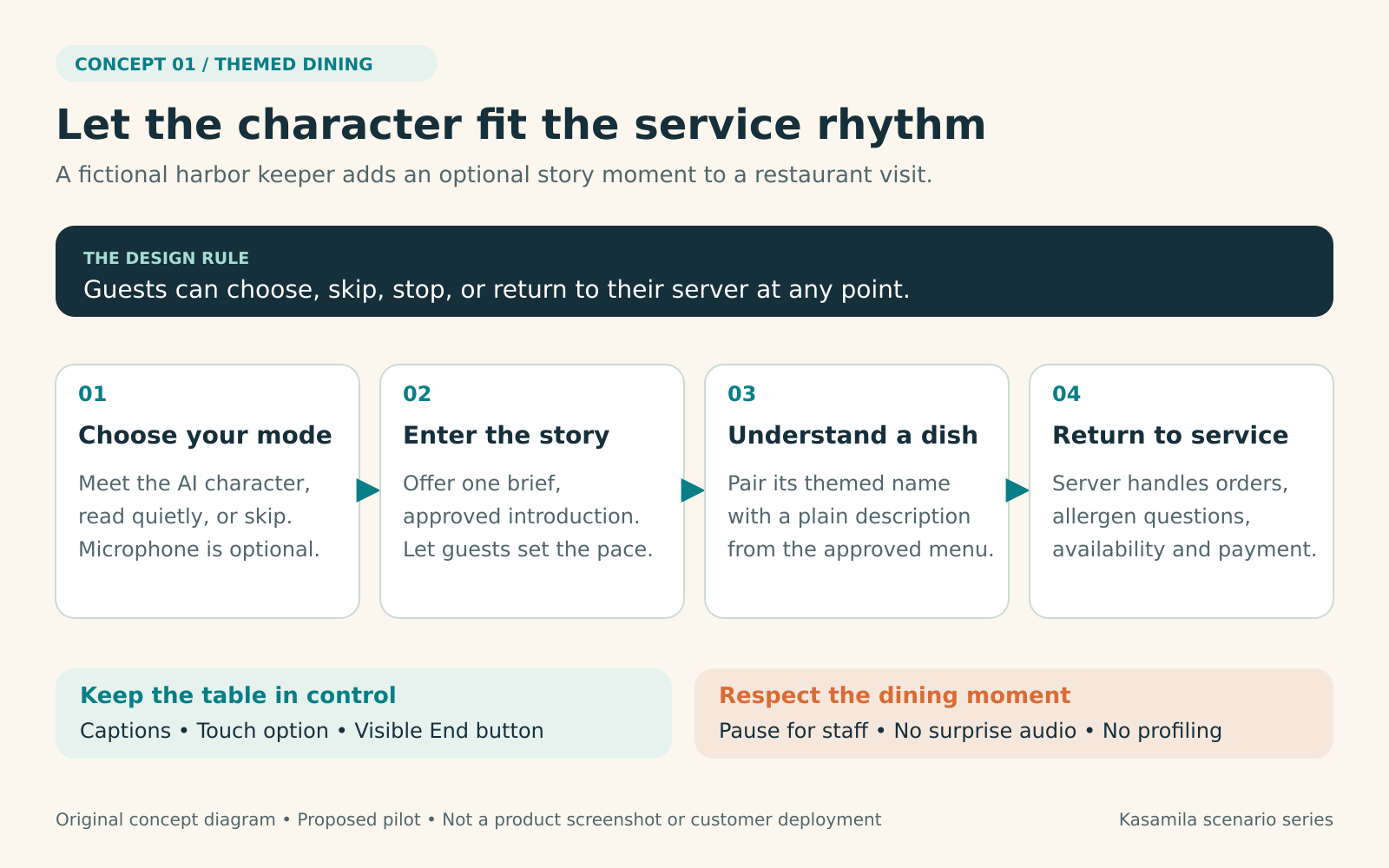
Figure 1. A service-friendly guest journey. Original concept diagram, not a product screenshot or customer deployment.
Separate story, facts and presentation
The application needs two kinds of approved content. The story file defines the setting, character voice, allowed topics and short narrative moments. The menu file supplies accurate dish names and descriptions, with an owner and a review date. A character’s personality should never change those facts.
Use reviewed scripts for the welcome and common explanations. If an LLM is added, constrain it to the pilot content and make unsupported questions end in a clear request to check with staff. Treat menu text and retrieved content as information, never as instructions that can change the application’s rules.
Kasamila sits in the visual presentation layer. Its official guide describes audio-driven mouth movement and WebGL rendering in the browser. The restaurant application supplies the conversation logic and returned voice; speech recognition, an LLM and text-to-speech are separate choices. [1]
Feed the character’s returned speech into the avatar, not the guest’s microphone stream. Generate the visible answer and spoken response from the same approved content. The documentation supports several audio sources, including audio files, PCM/TTS streams and RTC audio tracks; the integration team should choose and test the path appropriate to its voice stack. [1, 2]
Keep the permanent API key on the backend. The browser receives a short-lived authorization scoped to the intended use. Prepare and host the required template media according to the developer guide, and test the actual device, browser, network and audio output before making a deployment commitment. [1]
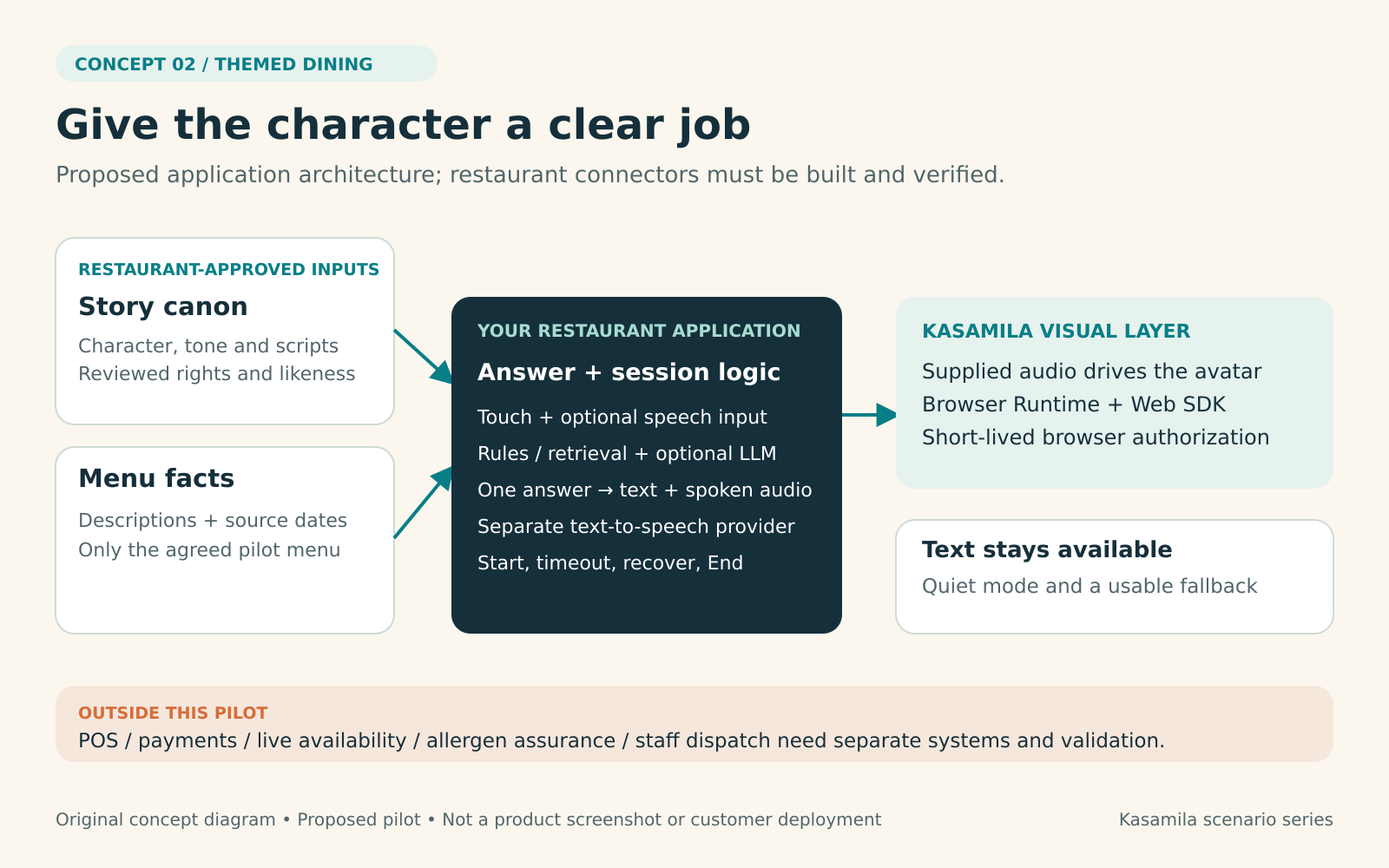
Figure 2. Proposed responsibilities and system boundaries. Original concept diagram; restaurant-specific connectors are implementation work.
Protect the meal from avoidable mistakes
Several boundaries should be explicit in the pilot:
- Food safety stays with the restaurant’s trained team. The character must not assure a guest that a dish is safe for an allergy, infer cross-contact risk or personalize medical advice. Direct these questions to staff without requesting or recording health details.
- Operational promises require verified systems. Availability, substitutions, prices and wait times can change. Leave them to staff in the first pilot unless the restaurant has approved a sufficiently fresh source and a failure path.
- Ordering and payment stay in the existing service flow. This concept does not assume a POS connector, payment integration or staff-dispatch system. Do not ask for card details in the conversation.
- The menu must survive a technical failure. If audio, rendering or connectivity fails, show readable approved content and a clear route to human help.
- A shared table is not a private booth. Avoid always-on listening. Minimize logs, do not retain raw guest audio by default, and review what every separately chosen speech or AI provider receives. Browser-based avatar rendering alone does not establish end-to-end privacy.
Assign owners before launch: the restaurant approves story and menu content; operations owns staff handoff and service timing; the integration team owns the application, credentials and session cleanup. A named operator should be able to disable the experience quickly.
Build the smallest complete pilot
Start in one dining area with a small set of explanations and agreed service windows. Test the entire journey with staff before inviting guests: opening the page, denying microphone access, choosing text, interrupting a reply, losing connectivity, reaching an unsupported question and ending the experience.
Then compare three versions:
- The current printed or static digital menu and staff-led experience.
- A voice-and-touch experience with the approved story and explanations.
- The same experience, using the same voice, answers and controls, with Kasamila’s avatar presentation added.
The comparison between the second and third versions is especially important. It asks what the visible character contributes beyond audio and touch. Keep content, prompts and service conditions comparable; rotate versions across comparable tables or service windows and record unusual events that could distort the result.
Agree on success criteria before collecting data. Useful measures include:
- Menu understanding: can the guest correctly describe the supported dish after the explanation?
- Experience quality: did the guest enjoy the moment, feel in control and find it appropriate for the meal?
- Service fit: how often did the interaction delay ordering, interrupt staff or need staff correction?
- Reliability and accessibility: completion, abandonment, fallback use and failures by supported device and input mode.
- Economics: total operating cost per useful completed session, with “useful” defined before the pilot.
Use a brief, optional adult feedback question and aggregated operational observations rather than building guest profiles. Report the sample size, uncertainty and negative outcomes. A longer conversation can reflect either enjoyment or confusion. Revenue uplift, labor savings and higher satisfaction should remain unproven until an appropriate study supports them.
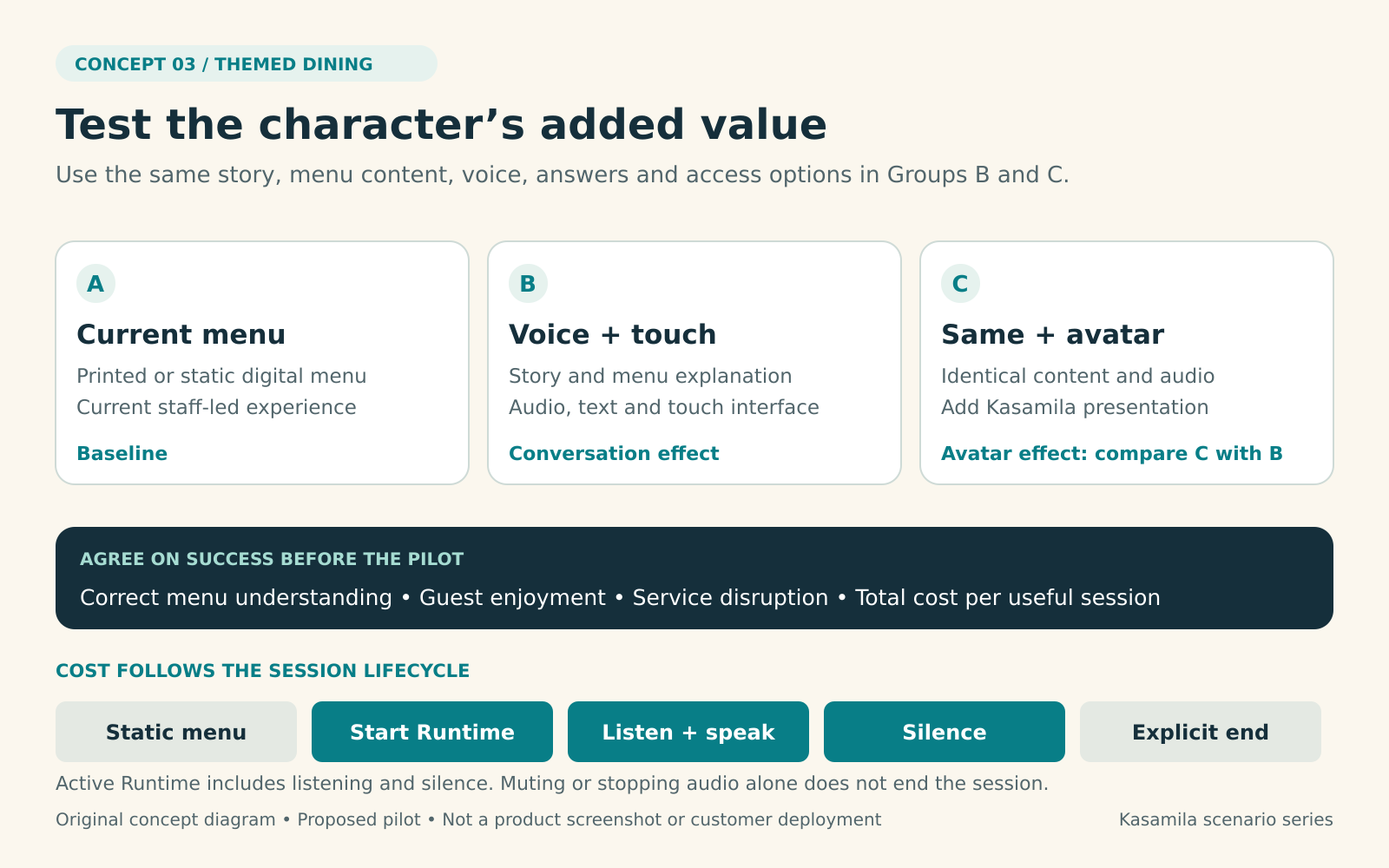
Figure 3. Isolate the avatar’s added value and account for the whole active session. Original concept diagram; no measured results are shown.
Budget for the session, including quiet moments
The public pricing page lists standard runtime packs equivalent to US$1 per hour, with per-second metering. Portal previews are free; API/SDK runtime has a separate usage model. Check current account entitlements, package validity and applicable taxes before launch. [3, 4]
The lifecycle is crucial: billing starts when a Runtime Session is created and includes listening, speaking, silence and idle time, including hidden pages. Muting or stopping audio does not end the session. Use the documented explicit end or destroy path, and provide cleanup for timeout and error cases. Without explicit termination, the reserved lease can continue to be consumed. [5]
For an illustrative budget, 100 sessions lasting two elapsed minutes each use 200 minutes, or about 3.33 runtime hours. At the published standard rate, that is roughly US$3.33 of avatar-runtime consumption. This is a usage calculation, not a purchase quote or complete project cost: pack purchases, templates, speech recognition, LLMs, text-to-speech, hosting, devices, integration, maintenance and taxes must be budgeted separately. [3]
Keep the ordinary menu outside an active Runtime Session. Start only when the avatar is needed; warn before an inactivity timeout; end explicitly when the guest finishes. Reconcile application session records with usage, set appropriate concurrency and spending limits, and fall back to text when the experience cannot run within its budget.
Give the character a reason to stay
A themed restaurant already has a rich experience to protect. A digital character earns its place when it helps guests understand that world, makes a menu choice clearer and respects the rhythm of service.
Begin with one small moment. Measure whether guests understand and enjoy it, whether staff can work comfortably around it, and whether the visual character adds enough value over the same voice-and-touch experience to justify the additional cost. Those answers provide a practical basis for deciding what to build next.
Official references
Checked 18 October 2026. The restaurant scenario and pilot design are original proposals. Product capabilities and pricing are grounded in the official sources below; no customer results or certifications are claimed.